
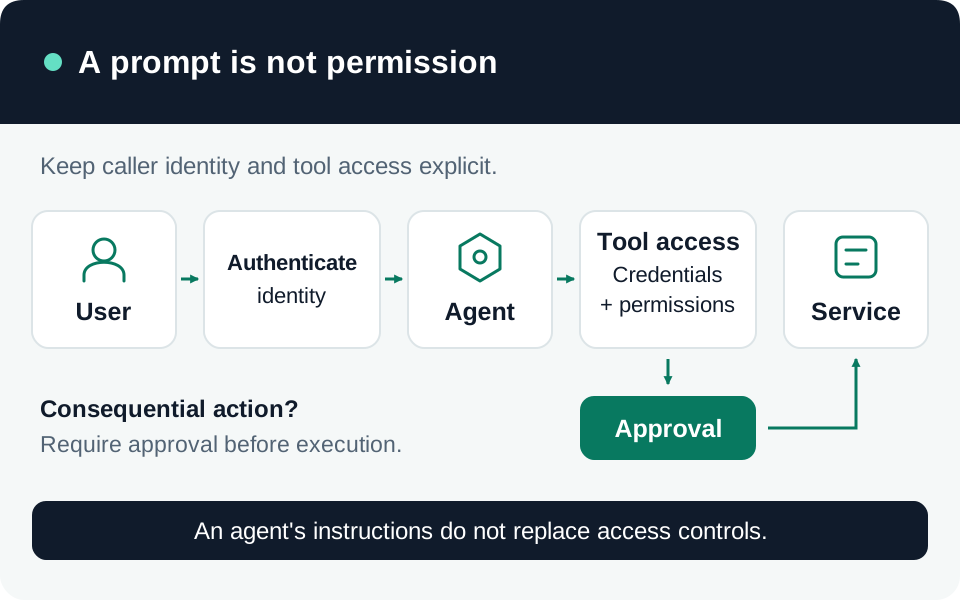
An agent can expose a service’s capabilities through a conversational interface. Review who may start the conversation, which identity each tool uses, and what the downstream service permits. These are separate decisions. This procedure focuses on Copilot Studio tools and connections in the standard harness; check the matching documentation for another harness or channel. The tests are proposed validation steps, not claims of a tested tenant configuration.
Establish the conversation boundary
Record Settings → Security → Authentication, the published channel and intended audience. No authentication allows anyone with the link to interact. Authenticated options have different sharing and channel behavior; for manual authentication, check whether sign-in is required before conversation. Authentication changes take effect only after publishing. Republish, then verify the actual channel with intended and excluded users. Agent authentication and sharing.
Tool authentication has its own compatibility requirements. User authentication is appropriate when access must follow the individual user’s service permissions. It is supported in channels including Teams and custom websites, but not the demo website; Teams also requires the documented SSO configuration. A successful maker preview is not evidence for another channel. Tool authentication and supported channels.
Inventory the authority behind every tool
Inspect Settings → Connection Settings and the tools and knowledge sources using each connection. Record its status and owner. The connection list shows what is connected, not whether its authority matches the intended audience. Manage connections.
Use one row per tool, including each downstream connection inside an agent flow:
| Review field | Example of a specific answer |
|---|---|
| Capability and target | Read a ticket in the pilot support queue; no ticket deletion. |
| Runtime identity | End-user connection, or explicitly identified shared service account. |
| Effective permissions | Named service role and allowed records, folders or API operations. |
| Inputs and outputs | Ticket ID validated by the service; only required fields returned. |
| Ownership and shutdown | Accountable team, connection owner and revocation procedure. |
Maker-provided credentials execute with the maker’s service permissions. A user can consequently receive data or perform actions their own account could not. For interactive agents needing per-user boundaries, evaluate enforcing end-user credentials through Control maker credential options in the Power Platform admin center. Both credential types are allowed by that control by default. Its environment or environment-group scope affects existing agents too; requiring live users can break scheduled or autonomous runs. Assess those dependencies before rollout. Maker-credential governance.
For an intentionally shared connection, record why every permitted agent user may exercise that authority. Keep its service permissions narrow and enforce record-level access in the backend where necessary. Agent sign-in alone does not provide that enforcement.
Constrain connectors and execution paths
Use Power Platform data policies to require authentication, block unwanted connectors or HTTP calls, and restrict publishing channels. For example, blocking Chat without Microsoft Entra ID authentication in Copilot Studio prevents unauthenticated agents. Endpoint filtering can narrow permitted HTTP destinations. Verify the policy applies to the intended environment and produces a denial for a prohibited operation. Agent data policies.
Separate experimentation and production environments, with defined owners and promotion criteria. Microsoft’s zoned strategy treats environments as boundaries for roles, data policies and lifecycle management. Zoned governance.
For consequential writes, inspect each tool’s Ask the end user before running setting: it defaults to No. Also decide whether generative orchestration may select the tool dynamically or it should be called explicitly from a topic. These controls change execution behavior; they do not replace the target service’s authorization. Tool settings.
Where a business process requires an approver, enforce that approval in the workflow or backend, tied to the actual action and target. A prompt saying to ask first is insufficient. As a design requirement, cancellation, missing approval and changed action parameters should prevent the write.
Test denial, cancellation and recovery
Use synthetic records and a published test channel. Retain the agent version, user, connection identity, target, expected result and sanitized service-side evidence for each check:
- An intended user performs one permitted read; an excluded user cannot enter the protected experience.
- A permitted user requests another user’s restricted record. The service denies access, including when the record ID is supplied directly.
- A prohibited connector or endpoint remains blocked even when the prompt explicitly requests it.
- A write with cancelled or missing approval makes no downstream change. Retrying after a timeout does not duplicate the approved action.
- Disconnect or revoke a test connection and verify that new actions fail; document observed delays and recovery steps.
Keep a stop procedure covering agent access, autonomous triggers and downstream connections. Recheck the matrix after changes to channels, policies, tools or connection owners. Publish only the capabilities whose effective authority and failure behavior match the intended use.
Go to the source
References & further reading
- Microsoft Learn — Configure user authentication in Copilot Studio
- Microsoft Learn — Configure user authentication for tools
- Microsoft Learn — Control maker-provided credentials
- Microsoft Learn — Configure data policies for agents
- Microsoft Learn — Add tools to custom agents
- Microsoft Learn — Configure and manage connections
- Microsoft Learn — Implement a zoned governance strategy