
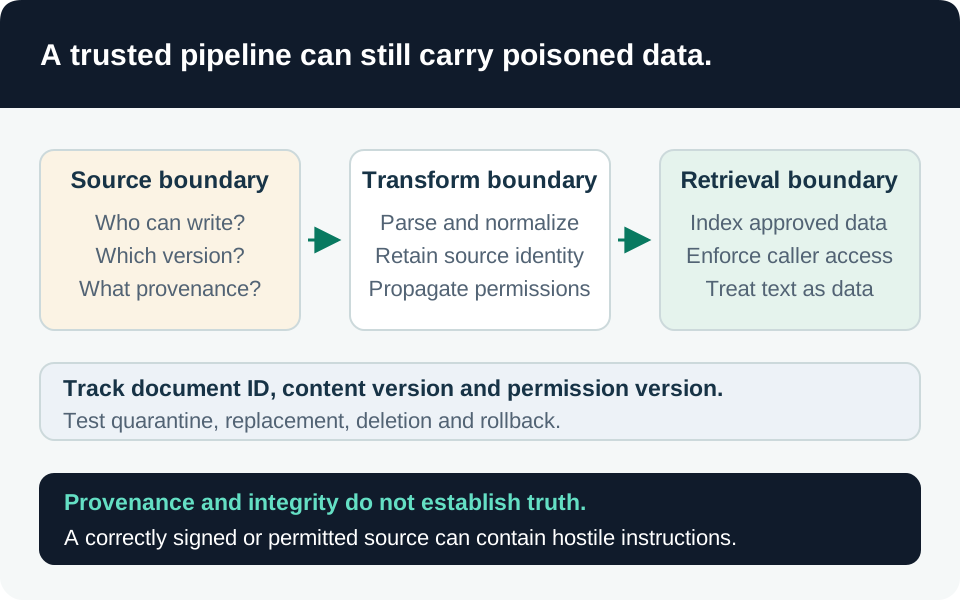
A document can be readable, correctly indexed, and malicious. Retrieval authorization answers who may see content; ingestion integrity asks which content may influence the application and whether its origin and transformations remain verifiable. This guide addresses application-owned RAG using Azure AI Search. The proposed pipeline and acceptance criteria are engineering recommendations, not a claim that Microsoft provides an automatic poisoning-proof ingestion gate.
Threat model, scope, and prerequisites
Consider a compromised source contributor, an attacker-controlled public page, a changed parser, or an identity that can write directly to the serving index. Poisoning includes plausible false facts, ranking manipulation, and malicious instructions. It can persist in chunks and embeddings after the source is corrected. Microsoft’s grounding-compromise model includes these paths, not only obvious “ignore previous instructions” text. Grounding data compromise.
Identify source owners, approved repositories, sensitive-data categories, ingestion administrators, and the operator who can stop publication. Budget for a quarantine store, processing services, a candidate index, and restricted evidence retention. Confirm region, quota, model/skill availability, and any source-system licensing; an existing Search service does not grant access to every external repository or processing service.
Pin parser, embedding model, chunking configuration, and Search API versions. The core indexer workflow has stable APIs, but enrichment caching and several targeted reprocessing operations are preview. Keep preview acceptance explicit and separate from a production integrity guarantee. Reprocessing operations, Cache release status.
1. Define an independently controlled source manifest
Our recommended manifest identifies each approved source version, its owner, canonical origin, original-byte digest, approval record, permission state, and processing configuration. Store parent-to-chunk relationships and transformed-content digests alongside the resulting index generation. Use a defined digest algorithm such as SHA-256; record exactly which bytes were hashed.
Keep approval records and the manifest outside a source contributor’s write authority. A digest stored beside an attacker-editable document can be changed with the document. A valid digest establishes byte identity, not factual truth, legitimacy, or permission to disclose the content. Likewise, a URL printed inside a document is a claim, not trusted provenance.
Prevent changes between approval and processing: ingest the approved immutable snapshot, or verify the fetched version and digest immediately before transformation. Record the actual fetched origin and redirects through trusted pipeline code. Restrict fetch targets and redirect destinations to the source policy; do not let a document choose an internal endpoint for the ingestion service to contact.
Separate authoritative internal policy, ordinary collaboration, and untrusted external material. A single mixed index is simpler to operate, but needs mandatory trust-domain metadata and retrieval policy. Separate indexes provide a clearer boundary at additional capacity and management cost. Neither design turns approved authors into infallible sources.
2. Separate publication authority from content contribution
Give the serving application Search Index Data Reader, not a writing role. Use separate principals for source retrieval, approved index publication, and schema administration. Search Index Data Contributor can alter documents; Search Service Contributor can manage objects and retrieve keys. Review key access as well as direct data roles. Search authorization boundaries.
Do not assume an index-scoped assignment constrains everything an administrator can cause an indexer to do: Microsoft documents indexers operating with service-level write permissions. If untrusted teams independently configure ingestion, consider separate Search services rather than relying solely on per-index separation. Indexer permission scope.
Keep ranking boosts, trust labels, approval state, and source identifiers under pipeline control. An author-supplied “verified” field must not become a trusted ranking or publication signal. Detect direct index writes that bypass the manifest by reconciling expected document keys and generation metadata.
3. Quarantine, transform, and preserve security metadata
Before embedding, enforce file-type, size, decompression, and parser-resource limits. Treat documents and extracted links as data; do not execute embedded scripts or let extracted instructions invoke tools. Apply the organization’s malware and sensitive-data checks, and route ambiguous results to a named reviewer. Preserve originals only in a restricted evidence location with a defined retention period.
Prompt Shields can identify supported adversarial instruction patterns. That does not establish factual accuracy or prove a document free of manipulation. A poisoned financial value or fabricated procedure may contain no instruction attack at all. Use detection as one signal, and retain independent authorization on any resulting agent action. Prompt Shields scope.
When a supported architecture uses a Custom Web API skill, authenticate the endpoint and validate its outputs. authResourceId identifies the target API’s token audience; it is not automatically the Search service URL. Handle the documented record contract and retries without duplicating publication or changing approved source identity. Custom skill contract and authentication.
There is a critical compatibility boundary: native ADLS permission ingestion does not carry permission inheritance through Custom Web API skills, enrichment caches, knowledge stores, or debug sessions. Do not insert a custom sanitizer into that path and assume ACLs remain protected. Preprocess into an approved source or select an explicitly designed ingestion model that preserves authorization. See native inheritance limitations and the document authorization guide.
4. Promote only a reconciled candidate generation
Build a candidate from the approved manifest. Compare expected source versions, document keys, child chunks, permission fields, and processing versions with actual output. Check the extracted text, not merely successful embedding calls. Use known-answer questions, denied-document tests, and adversarial source fixtures before changing the serving generation.
An indexer run can report success while individual documents failed below its configured threshold. Inspect per-run errors, warnings, processed items, and failed items. A green status is not evidence that every approved record arrived or every obsolete chunk disappeared. Indexer execution evidence.
Our recommended release record binds the manifest, candidate generation, evaluation results, and approver or automated policy decision. Define which failures block promotion. Measure source distribution in retrieved results to investigate unexpected dominance, while recognizing that a distribution shift alone does not prove poisoning.
5. Make deletion and rollback part of integrity
Source deletion does not automatically remove Search documents. Configure deletion detection from the first indexer run. Native blob soft-delete detection requires blob versioning to be disabled and enough retention for the indexer to observe deletion. If versioning is a recovery requirement, choose a compatible alternative, such as a controlled tombstone workflow; do not disable recovery protection casually. Storage deletion requirements.
A reset followed by a run does not remove orphaned documents. Explicitly reconcile and delete stale keys or rebuild from a trusted manifest. Changed external skill code can require deliberate skill reprocessing; unchanged configuration does not establish unchanged output. Reset and reprocessing semantics.
Treat preview enrichment caches as managed intermediate state, not backups, and do not edit their contents. Cache limitations. Recovery must also invalidate application result caches and prevent a rollback from resurrecting withdrawn content. Preserve old generations only under restricted investigation access.
Allowed and denied acceptance cases
| Case | Expected outcome |
|---|---|
| Approved source version and intact provenance | Eligible for publication after content and permission checks |
| Missing approval, unknown origin, or direct untracked index write | Quarantined or excluded from serving |
| Source changes after approval | Version/digest mismatch blocks the old approval |
| Plausible false fact without an injection pattern | Classifier silence does not grant trust; quality review still applies |
| Document requests an external tool action | Document text grants no execution authority |
| Partial indexing failure | Unreconciled candidate cannot silently become complete |
| Withdrawn source or obsolete child chunk | Absent from retrieval and reusable answer caches |
| Rollback to a previous generation | Withdrawal and current authorization rules remain enforced |
Retain run IDs, source versions, manifest digests, transformation versions, and sanitized retrieved-document IDs. For a bad answer, inspect the actual retrieved version before blaming the model: stale chunks, altered ranking metadata, and cached answers require different fixes. Contain a compromised corpus at retrieval or serving boundaries while investigating; editing a system prompt alone does not repair poisoned stored content.
Go to the source
References & further reading
- Microsoft Learn — Grounding data compromise
- Microsoft Learn — Prompt Shields
- Microsoft Learn — Connect to Azure AI Search using roles
- Microsoft Learn — Custom Web API skill
- Microsoft Learn — ADLS Gen2 permission metadata ingestion
- Microsoft Learn — Monitor indexer status and results
- Microsoft Learn — Change and delete detection for Azure Storage
- Microsoft Learn — Run or reset indexers, skills, or documents
- Microsoft Learn — Configure an enrichment cache