Intelligence assessment
Treat ToolShell as a server-compromise and trust-recovery problem. In its July 2025 reporting, Microsoft described exploitation of on-premises SharePoint, theft of ASP.NET machine keys, and subsequent persistence. The July 23 update connected Storm-2603 activity with Warlock ransomware. Those are dated observations; this dossier does not establish that the same operators are active in a particular environment in November 2026. Microsoft incident report.
The recommended response below separates three questions: whether the vulnerable entry path is fixed, whether secrets remain trustworthy, and whether the farm is clean. A successful patch answers only the first. This is a documentation review, not a live exploitation test or a forensic clearance.
Scope and the CVE distinction
CVE-2025-53770 and CVE-2025-53771 concern on-premises SharePoint Server. SharePoint Online is excluded from this advisory. Microsoft associated the newer vulnerabilities with the earlier CVE-2025-49704 and CVE-2025-49706 issues; the four identifiers should remain separate in inventory and remediation records. July’s initial fixes must not be used as evidence that the later bypass issues were covered. MSRC customer guidance.
Historical affected product families included SharePoint 2016, 2019, and Subscription Edition. The support position has changed: 2016 and 2019 reached end of support in July 2026. For a November 2026 recovery, plan migration to a supported platform rather than treating installation of a historical security update as a sustainable operating state. Older unsupported editions are not declared safe by their absence from a supported-product fix table. Microsoft 2026 lifecycle list.
Inventory every farm member, web application, alternate access path, management endpoint, service identity, and document integration. Include servers behind proxies: absence of direct internet exposure does not show that untrusted requests cannot reach them. A Microsoft 365 tenant using SharePoint Online can still own a separate vulnerable on-premises farm.
Why patching alone leaves a gap
At a high level, the reported attack chain crossed from crafted web requests into server execution and access to signing material. Stolen machine keys can preserve an attacker’s ability to produce trusted application data after the initial entry flaw is patched. Microsoft also documented web shells and follow-on command execution. Indicator matches therefore need a timeline, not just a file deletion. Reported attack mechanics.
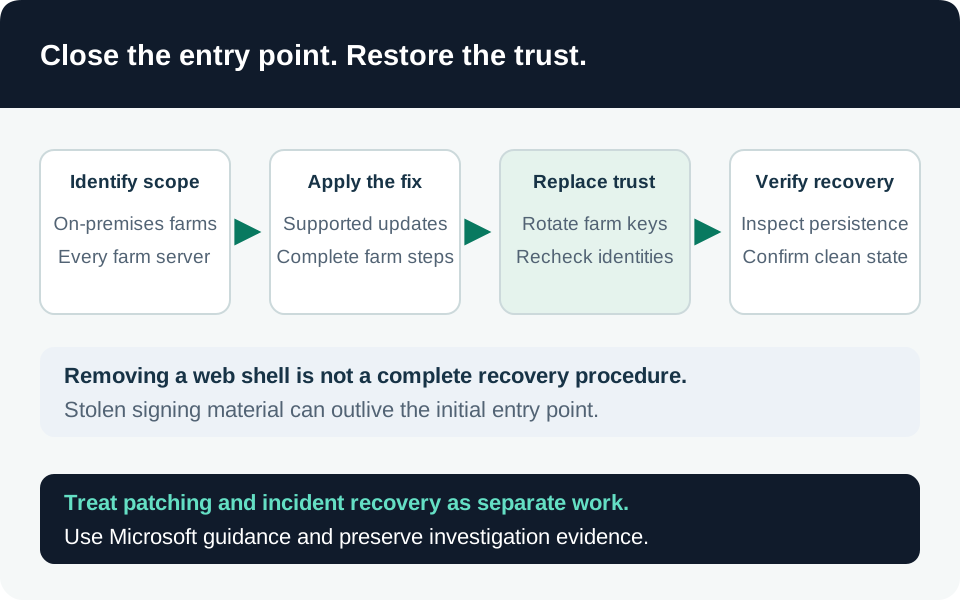
Our operational inference is that a still-compromised server can undermine recovery by obtaining replacement secrets. Rotate keys as part of controlled containment and restoration, with explicit ownership for every member. Do not reconnect an unexamined server merely because another node is healthy.
Ordered hardening and recovery
- Define the incident boundary. Record internet and internal exposure, first available logs, last known clean state, and missing evidence. If compromise is suspected, restrict access and preserve evidence while the response team assesses the farm. Record the impact of containment on document-dependent business services.
- Remove the vulnerable entry path. Use the latest applicable security updates on a supported SharePoint release. Verify every server’s installed state and required configuration tasks. Historical 2016/2019 instructions required both core and language-pack updates; an inventory containing only one package was incomplete. Update requirements.
- Verify defensive inspection. Enable and validate supported AMSI integration with an appropriate antimalware provider. Check actual request coverage and Full Mode availability for the installed release. A configured switch without a working provider is not evidence that inspection works. Keep an owner for exclusions and performance exceptions. AMSI configuration.
- Replace exposed application trust. Follow Microsoft’s farm-aware machine-key procedure after applying the required protections, distribute the new keys, and restart IIS across the affected servers. Plan the service interruption. Record successful completion per web application and server without copying secret key values into tickets. Key-management procedure.
- Address broader compromise. Investigate service-account access, scheduled execution, changed permissions, outbound connections, and downstream systems reachable from the farm. Rotate other credentials according to demonstrated or plausible exposure, with dependency owners involved. A machine-key rotation does not reset unrelated identities.
- Restore from a defensible baseline. Rebuild suspect nodes where integrity cannot be established. Validate backups and configuration before reuse, then restore access gradually. Record unresolved evidence gaps and who accepted the residual risk.
Current releases also support scheduled machine-key rotation; Microsoft’s key-management documentation identifies the applicable versions and timer job. Verify that recurring control after recovery, but do not wait for its next schedule when responding to suspected theft. Routine rotation and incident eradication answer different questions. Automatic rotation.
Detection evidence and its limits
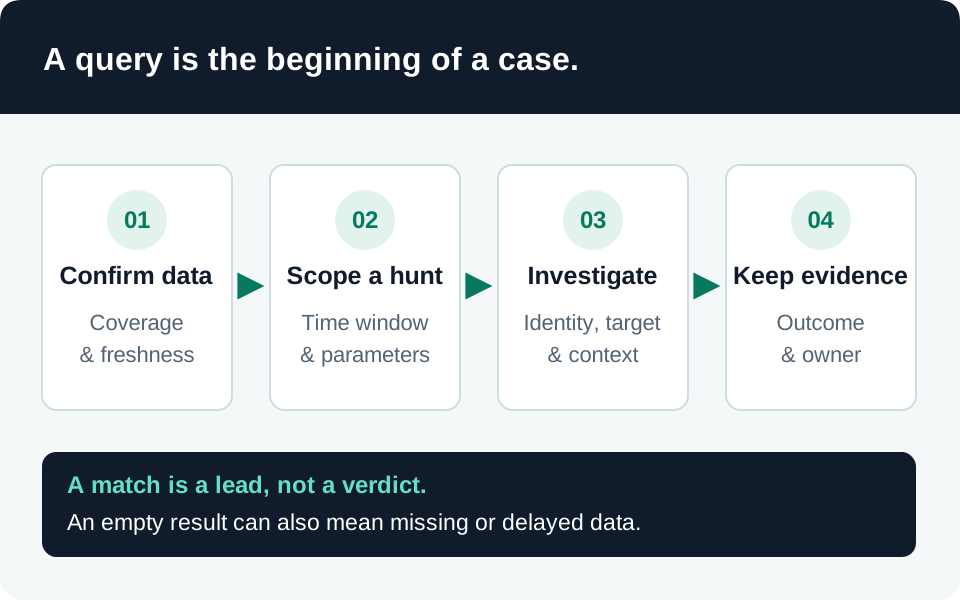
Use endpoint, IIS, SharePoint, network, and identity evidence together. Microsoft’s report supplies dated indicators and Defender hunting examples for investigation. Their known filenames are leads rather than a complete set of malicious files; their exposure inventory identifies vulnerability, not successful exploitation. Vendor hunting material.
For each suspicious event, retain host identity, UTC time, parent process, account, file path, hash when available, requested URL, and the original record. Correlate unexpected server-side file creation with IIS child processes, sensitive configuration access, and outbound traffic. Require an explanation for authorized maintenance that could produce similar behavior.
The linked security-alert triage query is a starting inventory of available alerts. The ingestion-source silence query helps expose missing telemetry. Neither detects ToolShell specifically. Microsoft Defender advanced-hunting tables and Sentinel workspace tables are not interchangeable; establish connector coverage before adapting vendor queries. An empty result from an unconnected server supplies no clearance evidence.
Verification matrix
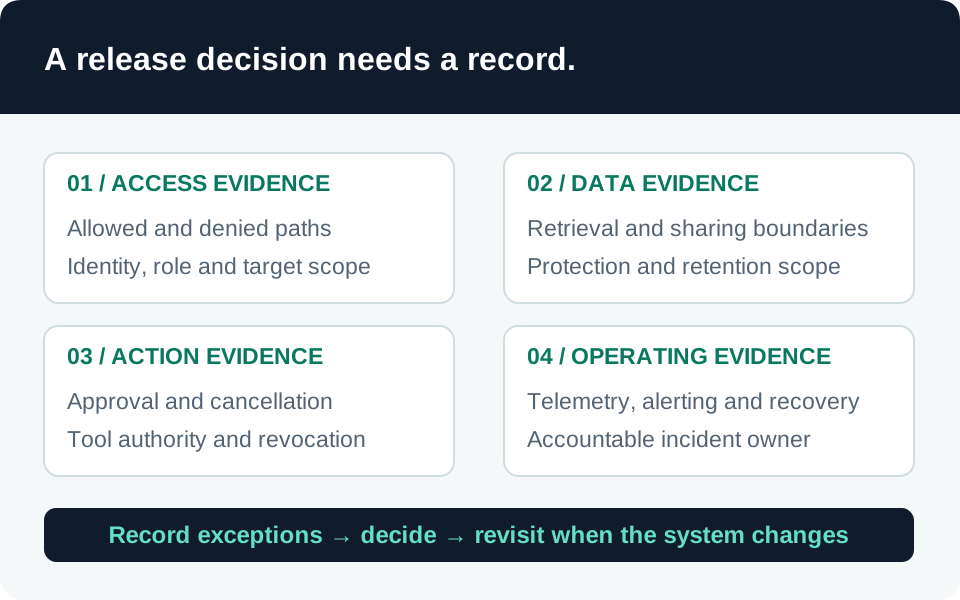
| Recovery question | Evidence required | Insufficient evidence |
|---|---|---|
| Is the platform maintainable? | Supported release and documented update route | Historical July 2025 fix installed |
| Is each node protected? | Per-node update and inspection checks | One healthy load-balancer response |
| Was application trust replaced? | Completed farm-wide key deployment and restart record | A key-change command on one node |
| Is persistence addressed? | Preserved investigation results or clean rebuild evidence | Deleting one known web shell |
| Can monitoring see recurrence? | Recent endpoint and server records reaching analysts | An enabled connector with no events |
Assign an owner and timestamp to each row. Repeat the checks when an old farm member is reintroduced or a backup is restored.
Dated timeline
| Date | Verified development |
|---|---|
| 19 July 2025 | MSRC published customer guidance for CVE-2025-53770. |
| 22–23 July 2025 | Microsoft published and expanded its exploitation report, including ransomware activity. |
| July 2026 | SharePoint 2016 and 2019 reached end of support. |
| 13 November 2026 | This dossier reviewed the cited guidance; no tenant investigation or new campaign claim is implied. |
Retain the historical exploitation date separately from this publication date. Reassess after new advisories, changed farm membership, or discovery of previously unmonitored servers.
Trace the evidence
Primary intelligence & product guidance
- MSRC — Customer guidance for SharePoint vulnerability CVE-2025-53770 ↗
- Microsoft Threat Intelligence — Disrupting active exploitation of on-premises SharePoint vulnerabilities ↗
- Microsoft Learn — Improved ASP.NET view state security and key management ↗
- Microsoft Learn — Configure AMSI integration with SharePoint Server ↗
- Microsoft Lifecycle — Products ending support in 2026 ↗