
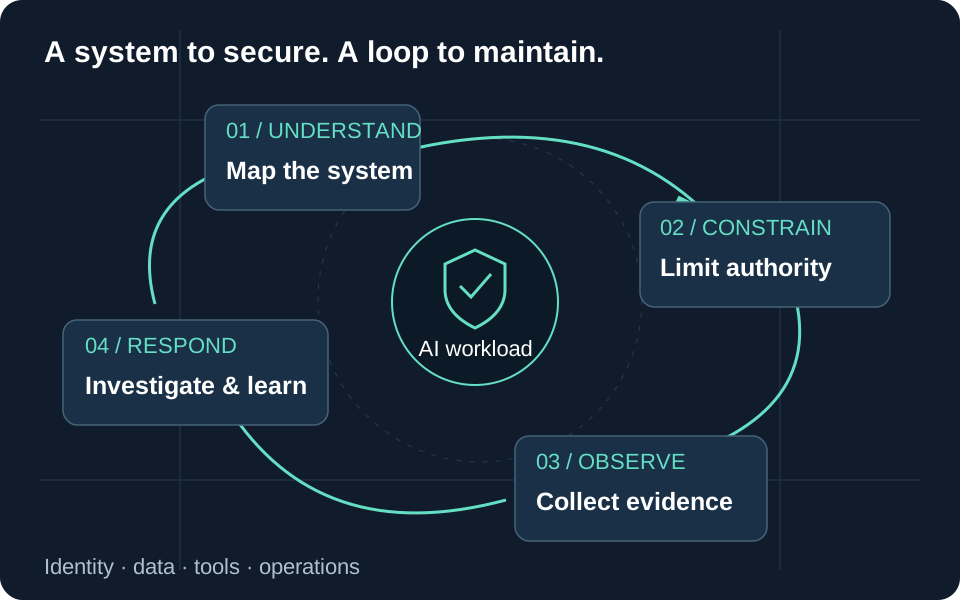
Use this playbook when an AI system may expose restricted data, perform an unauthorized action, consume malicious retrieved content, or produce harmful output in a consequential workflow. The sequence is a proposed response procedure; it does not establish that any particular alert is an incident.
Microsoft recommends adapting incident response to uncertain model behavior, contextual harm, and telemetry gaps. Preserve ordinary incident ownership and containment while avoiding a single successful rerun as proof of recovery. Incident response for AI systems.
Prerequisites
Maintain an owner map covering the application, identity, model resource, retrieval store, connectors, and monitoring destination. Prepare an authorized containment operator and a protected evidence location. Include privacy, business, and communications contacts according to the affected workflow.
Rehearse how to stop a risky tool or restrict the application’s audience without depending on the agent to obey a new instruction. Keep emergency access usable if the usual deployment identity is implicated.
1. Declare scope and contain active harm
Record the first known time, affected environment, reporting user, symptom, and suspected operation. Separate observed effects from possible effects. Prioritize ongoing unauthorized access or changes, sensitive data exposure, and consequences for affected people; an unusual prompt alone does not establish severity.
Choose the narrowest effective containment you can verify: disable the affected tool or application path, restrict an audience, remove a compromised connection, or isolate a resource. Record the operator, timestamp, previous state, expected impact, and recovery condition. If narrow containment fails, escalate the scope through the incident owner.
For a compromised user, authorized administrators can block new sign-ins and revoke sessions. Existing access tokens and application-issued sessions require additional consideration; Microsoft Entra cannot directly revoke an application’s own session cookie. Verify effective denial at the affected application instead of assuming the administrative action immediately ended every session. Revoke user access.
2. Preserve evidence while stabilizing
Collect native event records, relevant configuration versions, identity and permission changes, resource identifiers, and the deployed agent or application version. Preserve originals with collection details and checksums, and analyze copies. Containment should not wait for a perfect archive, but avoid deleting the affected resource simply to make the alert disappear.
For Microsoft 365 Copilot, audit metadata and conversation content are different evidence sources. Prompt and response text requires an authorized content investigation path such as eDiscovery or DSPM for AI rather than an assumption that audit export includes it. Copilot evidence locations.
Treat suspicious documents, prompts, and tool responses as untrusted evidence. Do not replay them through a production agent with live write permissions. Use isolated reproductions and synthetic resources when investigating behavior.
3. Establish impact and the failed boundary
| Question | Evidence to seek |
|---|---|
| Was there an attempted or completed action? | Target-system result and resulting state |
| Which data was available or returned? | Resource permissions, access records, and authorized content review |
| Which identity crossed the boundary? | User, workload, connector, and delegated identity chain |
| What changed before the event? | Release, role, data-source, connector, and policy history |
| Does the weakness affect other workloads? | Shared identity, tool, configuration, or retrieval dependency |
Correlate the timeline using event identifiers and UTC timestamps. Document missing coverage, uncertain permission history, and unobserved downstream effects. Use the Copilot investigation guide and query library as starting points after confirming the actual schema.
4. Recover with explicit exit criteria
Repair the failed authorization, data, tool, or configuration boundary. A blocked phrase may buy response time but should not be the only durable fix. Microsoft recommends staged remediation and observation periods because AI behavior varies across inputs. Remediation and monitoring.
Retest the original failure and relevant variants in isolation, plus permitted behavior that containment might have broken. Restore access gradually where practical, with an owner, monitoring window, and rollback condition. Close only after recording residual risk, evidence limits, recovery results, and follow-up owners. Protect responders from unnecessary exposure to harmful content and keep raw sensitive evidence out of broad status updates.
Go to the source