
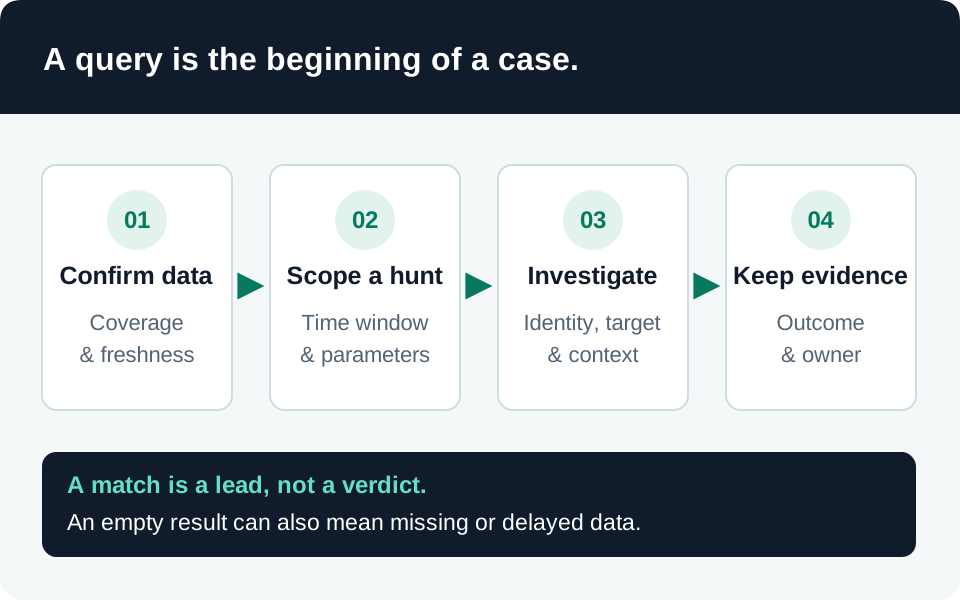
A Copilot investigation must distinguish an interaction, an accessed resource, an attempted action, and a confirmed disclosure. This procedure starts with Microsoft Purview evidence and then follows the data into your investigation platform. It describes a recommended workflow, not a completed investigation or a guarantee of event coverage.
Prerequisites
Confirm that organizational auditing is enabled, the relevant product records the activity, and an authorized investigator can search the required period. Microsoft documents Copilot auditing through Audit (Standard), but available fields and activity coverage differ by product. Verify retention and ingestion before promising a historical answer. Copilot auditing.
Open a case with a UTC time range, tenant, user identifier, application or agent, reported symptom, and known resource identifiers. Limit access to the case because event metadata can reveal confidential filenames, locations, and relationships.
1. Find and preserve the native interaction
Search Purview Audit for the relevant user and interval. Microsoft documents the Interacted with Copilot activity and Copilot workload searches; inspect the underlying record instead of relying only on a portal summary. Copilot interaction events and schema.
Export the relevant records using your approved evidence process. Preserve the original file, collection time, search filters, collector identity, and a checksum. Work on a separate copy when expanding arrays or normalizing fields. Start with a narrow interval, then expand to establish preceding configuration changes and subsequent activity.
If the native search is empty, check the time zone, user mapping, product coverage, retention, permissions, and expected delivery delay. An empty search is an unresolved visibility question, not proof that no interaction occurred.
2. Inspect the actual schema
Microsoft’s current documentation describes fields such as AppHost, agent details, and AccessedResources. Resource entries can include action, status, policy information, and XPIADetected; availability must be established from the records you receive. Missing values must remain unknown rather than becoming “allowed,” “no injection,” or “no resources.” Copilot audit fields.
Record where each field lives in your source JSON. Keep the original event identifier when expanding resource arrays so one interaction is not accidentally counted as several independent events. Treat an injection indicator as a triage lead and correlate it with the action outcome.
Before using the query library, verify the destination table and nested-field mapping against a sample event. A working Purview search does not prove that your Sentinel connector ingests the same record type or preserves the same field names.
3. Build a timeline without overclaiming
| Evidence question | Useful corroboration |
|---|---|
| Which identity interacted? | Native user and application identifiers, relevant sign-in evidence |
| Which resource was referenced or accessed? | Resource identifiers and the recorded action and status |
| Why was access possible? | Applicable permissions and relevant permission-change history |
| What was actually disclosed? | Authorized content review and corroborating downstream activity |
| Did an agent change anything? | Target system’s operation record and resulting state |
Current permissions do not necessarily reconstruct permissions at the event time. Mark that uncertainty explicitly. A resource appearing in an audit record does not by itself establish an external transfer, the complete answer text, or malicious intent.
4. Retrieve content only through the approved path
For the Microsoft 365 Copilot architecture documented by Microsoft, audit records contain interaction metadata, not prompt and response text. Content investigation uses capabilities such as eDiscovery or DSPM for AI, subject to the required access and retention. Data protection and auditing.
Keep the case conclusion separated into observed facts, supported inferences, and remaining gaps. If access or harmful actions remain possible, move to the AI incident-response playbook while preserving evidence. Avoid closing a case merely because an alert disappeared or a later prompt produced a different answer.
Go to the source