Assumptions to confirm
- One Microsoft Entra tenant, with additional tenants requiring separate connector planning
- This consolidated variant shares one platform Management subscription for security and operations
- West Europe is the example workspace region, subject to residency approval
- Entra, Microsoft 365 and Defender licenses are validated before connector onboarding
- This is a documentation-reviewed reference design, not a deployed or benchmarked environment
Use case and boundary decisions
A shared SOC supports several application teams, including an internal AI assistant and a customer portal. Investigators need a correlated timeline without giving every developer access to tenant sign-ins or every automation identity authority to disable users. The design below is an explicit consolidated-subscription variant, with service constraints supported by the linked documentation.
This variant places the security workspace, Sentinel resources, response automation and operational workspace in the platform Management subscription, separate from application subscriptions. It reduces subscription administration but increases coupling between security and operations administrators: broad inherited subscription permissions can affect both monitoring environments. Use separate resource groups and narrowly scoped roles, and accept that shared administrative boundary explicitly. The enterprise landing-zone design in this library remains the recommended enterprise separation: a Security subscription for Sentinel and security evidence, with operational telemetry in Management. Moving to that split preserves the collection paths described here while requiring destination permissions and deployment scopes to be updated. A subscription separates ownership and permissions; it is not a network boundary. Azure PaaS and Microsoft cloud connectors are not appliances inside application VNets.
Use one security workspace and one operational workspace here because the teams have different access and retention requirements. This is an explicit tradeoff, not a requirement to split every installation. Fewer workspaces simplify correlation and commitment-tier economics; table and resource access controls can remove the need for some splits. Microsoft workspace design guidance.
Components and control ownership
| Component | Selected design | Accountable owner and control |
|---|---|---|
| Security workspace | Regional Log Analytics workspace with Sentinel; Analytics plan for initial detection tables | SOC platform team; tightly scoped reader, responder and engineering roles |
| Operational workspace | Separate application diagnostics with only approved overlap | Platform operations; resource-context access where appropriate |
| Cloud sources | Dedicated Entra, Microsoft 365 and Defender XDR integrations | Identity and collaboration owners approve categories and licenses |
| Azure virtual machines | AMA with reviewed DCR associations in the application subscriptions | Workload owner maintains agent and OS audit policy |
| PaaS resources | Per-resource diagnostic settings | Platform policy deploys settings; application owner proves events arrive |
| Optional streaming branch | Event Hubs Standard plus a maintained ingestion adapter | Integration team owns consumer checkpoints, retries and schema |
| Response | Incident handling first; isolated Logic Apps playbook resource group | SOC approves each action and its target permissions |
| Configuration | Versioned infrastructure, rules, transforms and connector inventory | Platform and detection teams review changes together |
The collection view uses Azure virtual machines as its host source. An extension to on-premises or other-cloud servers requires separate Azure Arc onboarding and approved connectivity from those external networks to the required management and monitoring endpoints. Arc gives an external machine an Azure resource representation; it does not place that machine inside the application VNet. Validate its agent, DCR association and network path separately. Azure Arc-enabled servers scope.
West Europe is an example, not a residency determination. Document where each source, workspace and processing feature operates. Built-in Microsoft and Azure SaaS connectors require a workspace in the source tenant; a second tenant needs its own design. Cross-tenant management through Lighthouse does not erase that restriction. Sentinel workspace and tenant constraints.
Collection contract before onboarding
Record the source, category, destination table, expected latency, owner and retention decision before enabling a connector. Verify a generated event, not just a green configuration screen.
| Source | Actual route and expected table | Validation detail |
|---|---|---|
| Entra sign-ins and audit | Entra integration to SigninLogs and AuditLogs |
Sign-in ingestion requires the documented P1/P2 entitlement; workload risk feeds have additional licensing |
| Microsoft 365 audit | Microsoft 365 connector to OfficeActivity |
Confirm selected workloads, audit availability and realistic delivery latency |
| Defender XDR | XDR integration with selected incidents, alerts and event tables | Reconcile overlapping connectors and incident creation rules |
| Azure control plane | Subscription Activity Log diagnostic export to AzureActivity |
Use the Azure Activity connector policy; prove a benign administrative change arrives |
| Windows security events | Sentinel Windows Security Events via AMA to SecurityEvent |
Generic AMA Windows collection instead writes Event; forwarded-event collection has another table |
| Key Vault | AuditEvent diagnostic category to AzureDiagnostics |
Preserve operation, result, identity and resource context |
| App Service | AppServiceHTTPLogs category to AppServiceHTTPLogs |
Enable and verify the category on the actual app; do not assume every OS/configuration emits identical logs |
These mappings follow the Entra prerequisites, Microsoft 365 connector catalog, Defender integration, Sentinel Windows connector, generic Windows collection, and the current Key Vault and App Service log references.
Activity Log export is a subscription-level collection path, distinct from resource diagnostics. Enroll every workload subscription and the Management subscription so changes to collection and response infrastructure are visible. Azure Activity connector setup.
Numbered data and response flows
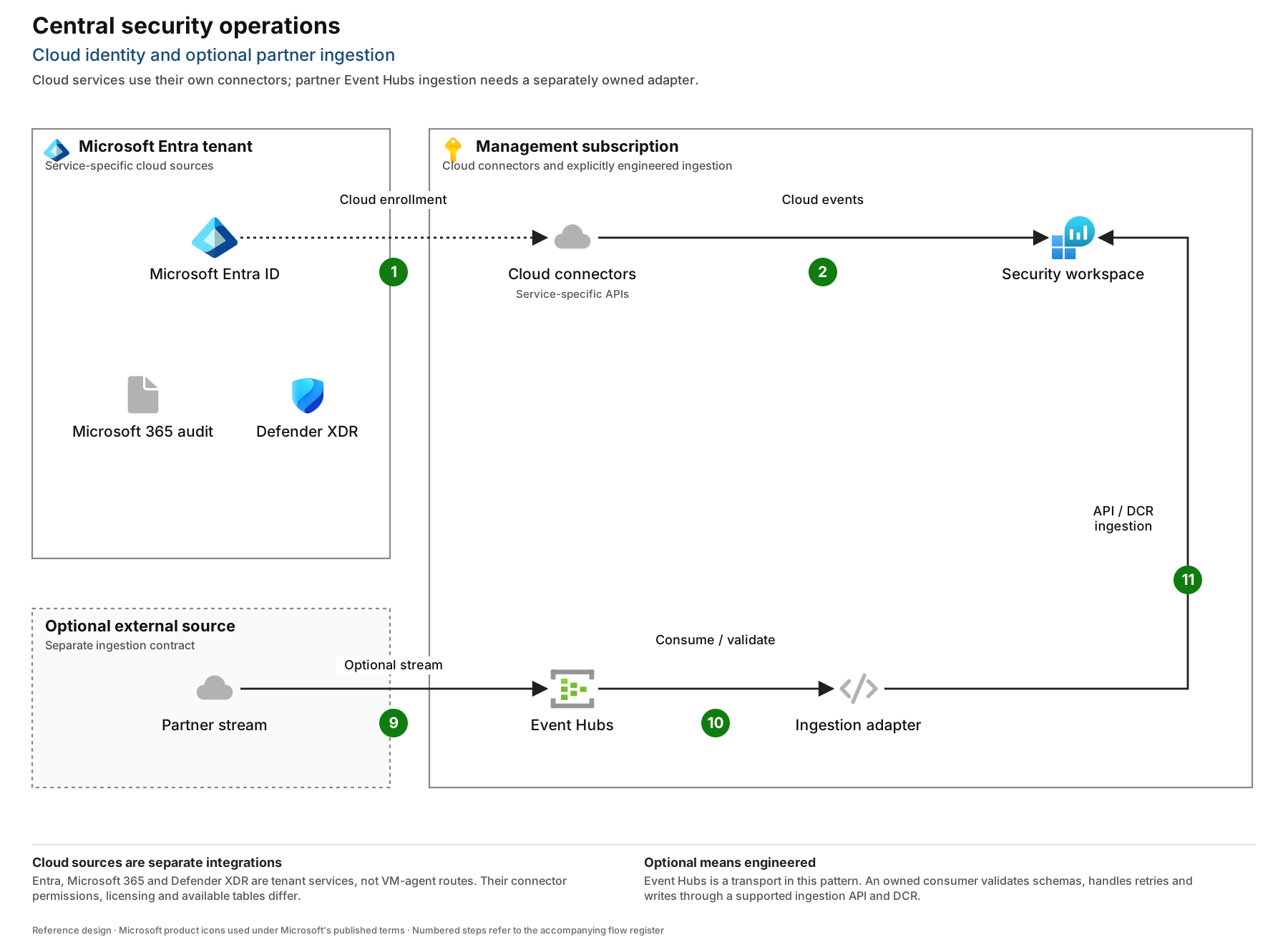
- F1 — Cloud source enrollment. The cloud-connector group represents separate Entra, Microsoft 365 and Defender integrations. It is not one agent or a shared network tunnel. In the Defender portal, account for automatically configured XDR integration before adding older connector paths.
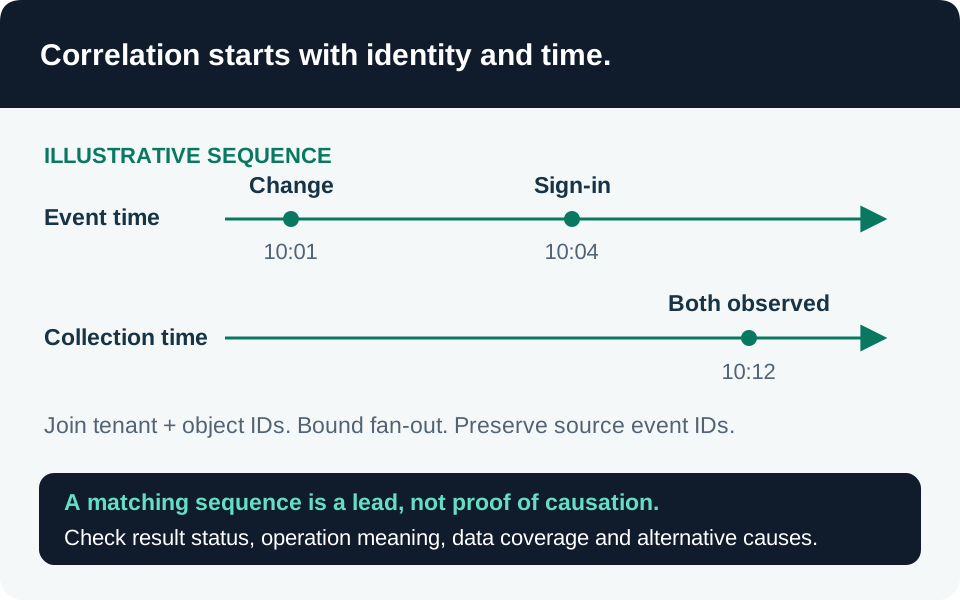
- F2 — Cloud delivery. Approved categories arrive in their security-workspace tables. Measure event time versus ingestion time independently for each feed.
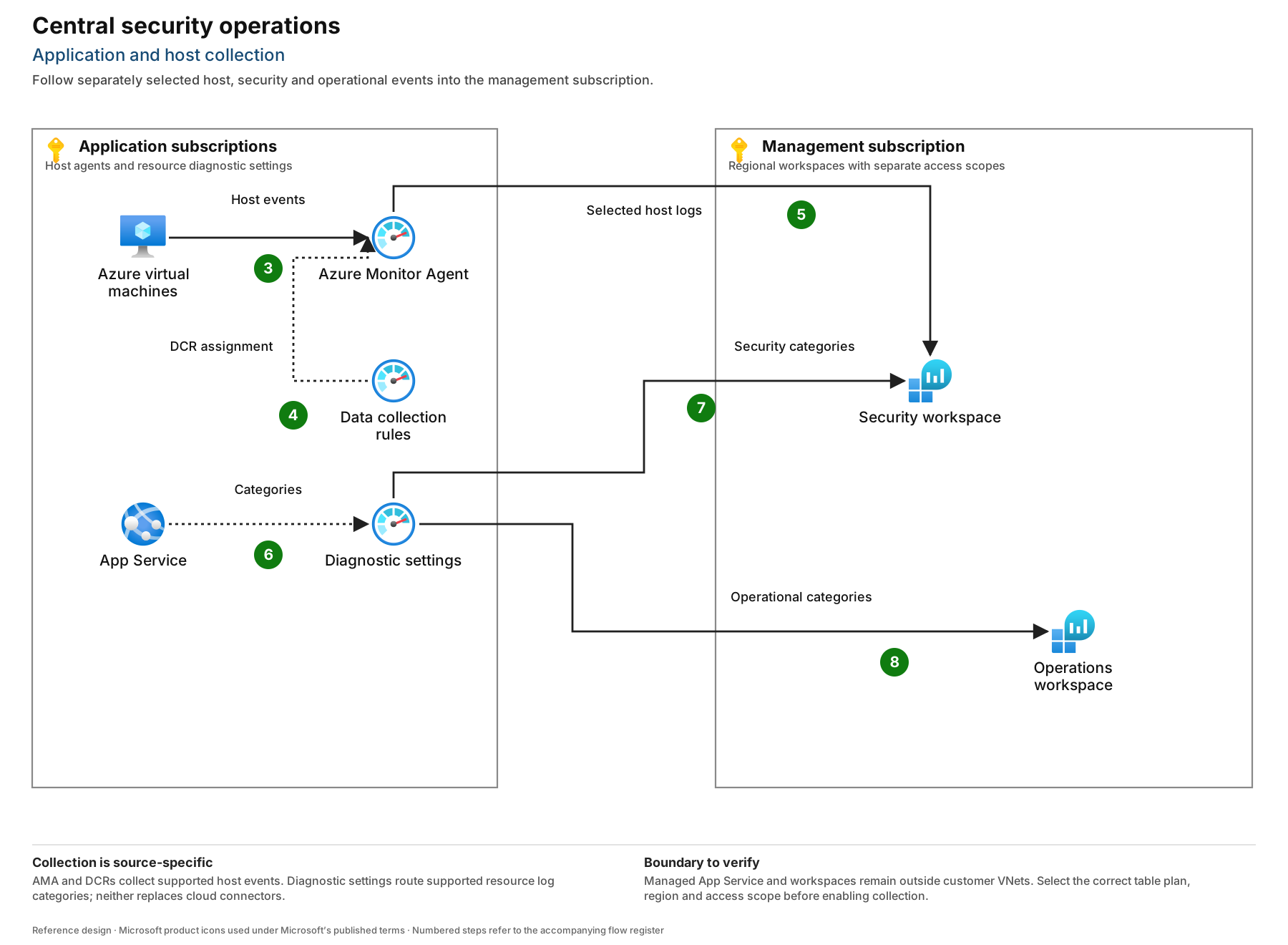
- F3 — Host collection. AMA reads selected local Windows events from onboarded machines. OS audit policy must produce those events first.
- F4 — Collection configuration. DCR associations define the approved event selection and destinations. Change review prevents duplicate collection and accidental removal of security events.
- F5 — Agent delivery. AMA sends selected events through its supported Azure Monitor endpoints. Permit required connectivity; the diagram does not imply that all cloud logs traverse these agents.
- F6 — Export selection. App Service and Key Vault each receive their own diagnostic setting; subscriptions receive Activity Log export settings. The Diagnostic settings node in the collection view represents configuration, not an intermediate collector; the illustrated App Service path does not replace other sources’ own settings.
- F7 — Security export. Required resource and Activity Logs go directly to the security workspace. Diagnostic logs are not enabled merely because a resource exists.
- F8 — Operational export. Only approved operational categories go to the operations workspace. Document intentional duplication and its ingestion charge.
- F9 — Optional external stream. A partner source writes a defined event contract to a dedicated Event Hubs namespace and consumer group.
- F10 — Consumer processing. An owned adapter reads checkpoints, validates records, isolates malformed messages and retries safely. This component is an integration responsibility, not an assumed built-in connector.
- F11 — Custom ingestion. The adapter uses a supported Logs Ingestion API/DCR schema and scoped identity. Preserve source identifiers to recognize retries and duplicates.
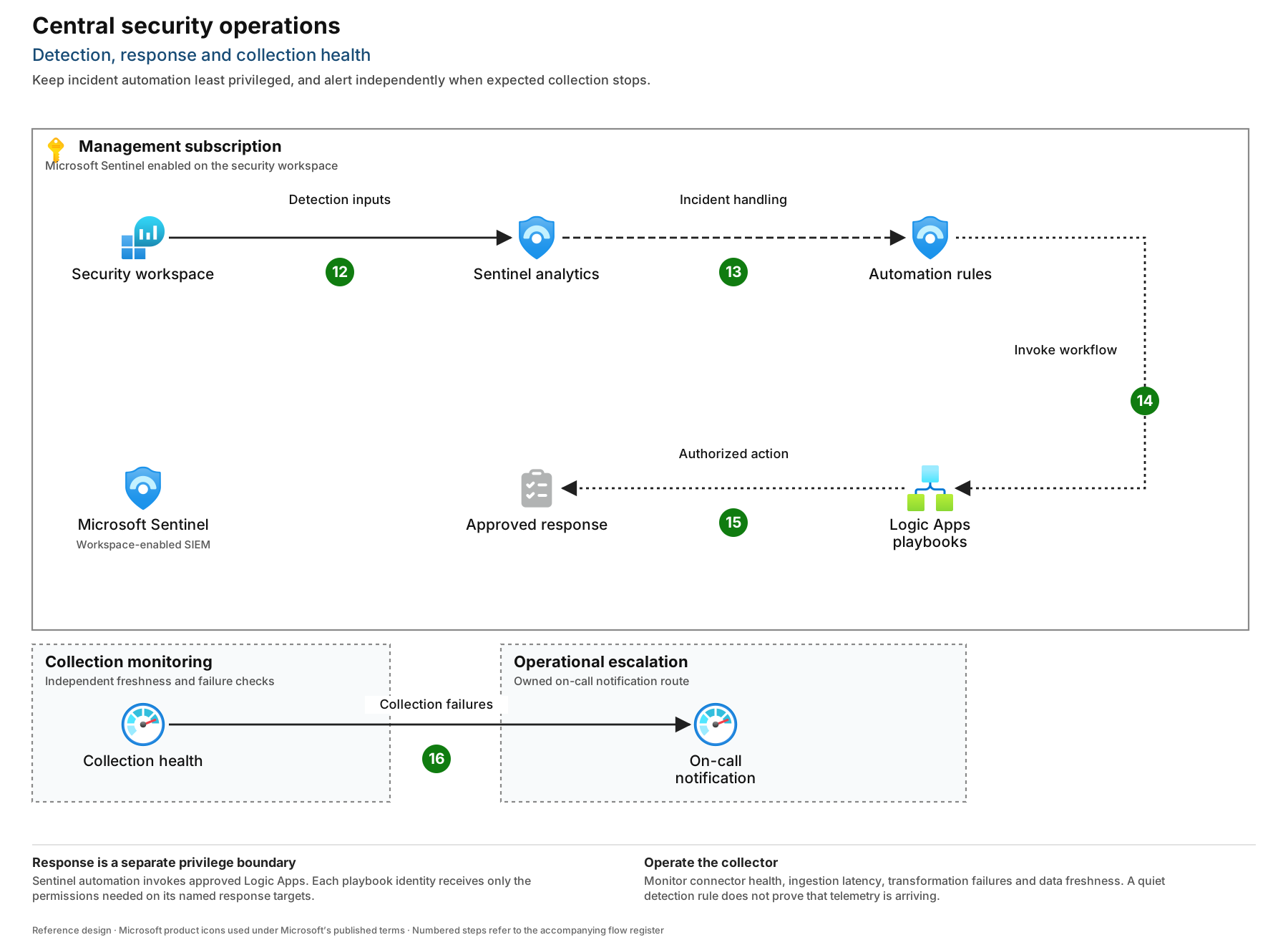
- F12 — Detection. Sentinel analytics query the security tables. Rule owners document required tables, scheduling, lookback, entity mapping and ingestion-delay tolerance.
- F13 — Incident automation. Approved analytics produce incidents and automation rules; begin with routing and enrichment.
- F14 — Workflow invocation. Sentinel receives permission to invoke playbooks in the isolated automation resource group.
- F15 — Controlled response. A playbook authenticates separately to its target API. Destructive containment requires an explicit approval step and a rollback procedure.
- F16 — Independent notification. Collector-health monitoring raises a service notification through an independently tested operational path; a workspace outage must not rely exclusively on querying that workspace.
Diagnostic delivery to a regional Event Hub or storage account requires a destination in the source resource’s region. Firewall-protected destinations have documented trusted-service requirements. These constraints do not mean every Log Analytics workspace must share every source region. Diagnostic settings restrictions.
Direct Event Hubs-to-Azure Monitor ingestion is a separate preview option with commitment-tier or dedicated-cluster prerequisites and regional capacity constraints. It is not the baseline adapter in F10–F11, nor a reason to put SaaS connectors behind Event Hubs. Direct Event Hubs ingestion prerequisites.
Sensitive data and response permissions
Exclude access tokens, authorization headers, raw prompts, document bodies and model responses at the producing application. Retain correlation identifiers and security-relevant metadata. Transformation support varies by connector and table; a workspace transform is neither universal nor retroactive. Test filters against actual sample events and check for another export retaining the original payload. Supported transformation paths.
Separate three authorities: the engineer who edits a workflow, Sentinel’s permission to invoke it, and the workflow identity’s permission on the target. Grant Sentinel Automation Contributor only on the intended playbook resource group. A managed identity that updates incidents needs the corresponding Sentinel write role; reading incidents does not require Contributor. Grant target API permissions independently and avoid subscription Owner. The Sentinel connector’s managed-identity authentication is currently documented as preview: approve that dependency explicitly, or keep that automated path disabled pending an accepted authentication design. Invocation permissions and connector authentication.
Acceptance and adversarial tests
| Test | Required evidence before production |
|---|---|
| Remove one DCR association in a test subscription | Missing-host telemetry is noticed within the agreed window and attributed to the correct owner |
| Disable a test diagnostic setting | Change telemetry and source-silence checks identify the gap; configuration is restored |
| Emit a canary secret-shaped value | Value is excluded at source; correlation metadata remains useful |
| Query as an application developer | Operational access works; tenant-wide security data remains unavailable |
| Replay a duplicate partner event | Adapter behavior and detection deduplication are documented |
| Trigger a playbook without target authority | Action fails safely and the incident shows the failure |
| Delay a connector feed | Rule lookback avoids a silent coverage gap or an explained limitation is accepted |
The related hunts are starting points for ingestion and configuration monitoring, not proof that the full architecture or any threat detection has been tested. In particular, ingestion-source-silence does not run unchanged against this baseline: it requires AZKVAuditLogs and StorageBlobLogs, while this design sends Key Vault AuditEvent to AzureDiagnostics and does not onboard Blob logs. Adapt the query to the actual collected tables, filter the appropriate resource categories, and validate its resource-identifier mapping and expected activity before use. Do not treat a missing table as evidence that a source is healthy.
Operations, recovery and cost
Enable Sentinel health and audit monitoring, inspect SentinelHealth and SentinelAudit, and monitor Logic Apps run outcomes separately. A successful trigger does not prove every response action succeeded. Track AMA heartbeat, source event freshness, ingestion delay, adapter backlog and rejected records. Sentinel health monitoring.
Keep critical detection tables on Analytics initially. Basic and Auxiliary/Lake have different query, alerting and feature support; they are not interchangeable cheap storage for an existing rule. Confirm each table and rule combination before changing plan. Choose table retention from investigation and contractual needs, then measure daily volume, duplication and query cost before selecting a commitment tier. A daily cap can create a detection blind spot. Azure Monitor table capabilities.
Roll out one application subscription and one cloud feed first. The platform team proves configuration redeployment; the SOC proves canary detection and incident handling; source owners sign off completeness. Rebuild a lost workspace from reviewed configuration, then reauthorize connectors and validate ingestion. Historical log recovery and regional continuity need a separately tested retention/export or replication design; infrastructure code alone does not restore evidence. Exercise that recovery quarterly and record measured gaps rather than promising a universal recovery time.
Trace the design decisions
Microsoft architecture & product guidance
- Design a Log Analytics workspace architecture ↗
- Extend Microsoft Sentinel across workspaces and tenants ↗
- Azure Monitor diagnostic settings ↗
- Sentinel diagnostic settings-based connections ↗
- Connect Windows-based services through Azure Monitor Agent ↗
- Collect Windows events with Azure Monitor Agent ↗
- Azure Arc-enabled servers overview ↗
- Connect Microsoft Entra ID logs to Sentinel ↗
- Connect Microsoft Defender XDR to Sentinel ↗
- Microsoft Sentinel connector reference ↗
- Key Vault supported resource logs ↗
- App Service supported resource logs ↗
- Azure Monitor table plans ↗
- Transform and filter data in Sentinel ↗
- Ingest events from Event Hubs into Azure Monitor Logs ↗
- Authenticate playbooks to Microsoft Sentinel ↗
- Automate and run Microsoft Sentinel playbooks ↗
- Audit and monitor Microsoft Sentinel health ↗