
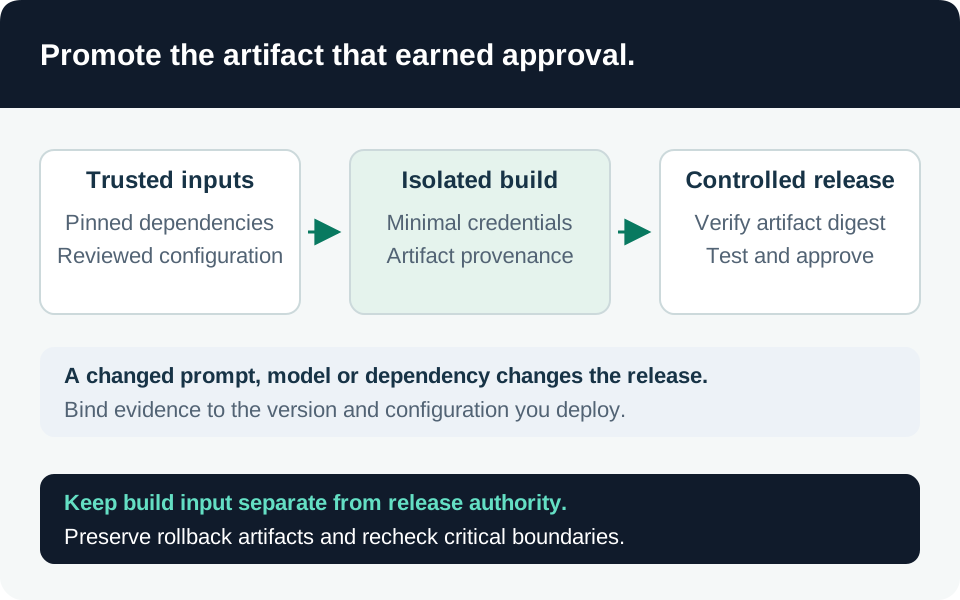
An AI release changes more than application code. A model deployment, system prompt, retrieval schema, tool contract, policy bundle, or dependency can alter the system’s authority and data exposure. Define the release as a set of verifiable artifacts with associated evidence. This guide proposes a control design; it does not claim that signing alone establishes model safety or that a tenant’s deployment chain has been audited.
Define what the approval actually covers
Create a release manifest containing the application artifact digest, dependency lockfile identity, model provider/deployment/version where available, prompt-template version, tool schemas and endpoint configuration, retrieval index/schema version, authorization policy, and evaluation report IDs. Record which parts the provider can update outside your deployment process and what monitoring detects that change.
Our recommended approval record binds to the manifest digest. A reviewer should be able to reconstruct the tested combination, not only a commit containing some of its configuration. Include migration and rollback prerequisites, data transformations, and known limitations. Treat a changed tool permission or retrieval filter as a security-relevant release even when no package version changes.
Keep secrets outside the manifest. Reference a controlled configuration identifier or vault object without embedding credential values. Store the manifest and evidence under access appropriate to their contents; a detailed internal topology can itself be sensitive.
Use artifact identity rather than a mutable name
Registry tags can move. Microsoft’s container guidance recommends unique deployment tags and describes the manifest digest as the artifact identifier. A Git commit alone may produce different images when a base image or build dependency changes. Tagging and versioning guidance.
Our deployment procedure resolves and verifies the digest once, then deploys that same digest. Re-resolving a convenient tag after verification creates a substitution window. Promote the already-tested artifact between environments where possible; if rebuilding is necessary, produce a new identity and repeat the required verification.
Keep sufficient retention for approved rollback artifacts and their dependencies. A release record pointing to a deleted manifest is incomplete recovery evidence. Test registry access using the actual deployment identity so operator credentials do not hide a missing permission.
Verify the publisher and the consumer policy
OCI artifact signatures associate an artifact descriptor with a signing identity. Verification checks integrity and whether that identity is trusted under the consumer’s policy. Azure’s guidance includes Notation with Key Vault or Artifact Signing, and applies to artifacts beyond container images, including configuration bundles and AI models. Signing and verification overview.
A signature proves neither that the signer was uncompromised nor that the content satisfies the application’s authorization requirements. Our policy therefore requires both cryptographic verification and separate evidence for dependency analysis, configuration review, and adversarial acceptance tests. An SBOM helps identify components; it is not a vulnerability-free certificate.
Manage the trust policy as a privileged artifact. Restrict who can add trusted publishers, weaken verification, or bypass admission. Test an artifact from an unapproved signer as well as an unsigned one. A valid signature from the wrong publisher should fail the intended trust policy.
Microsoft’s GitHub verification example uses a trust store, trust policy, and an OIDC-authenticated identity. Adapt these concepts with reviewed action versions and narrowly scoped permissions rather than copying example workflow versions indefinitely. Verification workflow.
Isolate build, signing, and deployment authority
Untrusted pull-request code should not obtain production signing or deployment authority. Separate workflows or jobs by trust boundary, constrain federated credentials to the intended repository and release context, and review changes to the workflow and trust policy as carefully as application changes. Use short-lived credentials instead of a permanent cloud key where supported.
The signing identity needs only the operations required to sign and publish evidence; the deployment identity needs only the target environment’s operations. A single identity that can modify source, sign arbitrary artifacts, and deploy everywhere collapses independent controls into one compromise path. Azure’s signing workflow shows the relationship between a registry and a Key Vault-backed signer; decide the production certificate and key lifecycle explicitly. Signing workflow pattern.
Gate the tested behavior, including rollback
| Gate | Evidence required |
|---|---|
| Artifact identity | Deployed digest matches the verified manifest |
| Publisher trust | Expected signer passes; wrong signer and unsigned artifact fail |
| Dependency review | Findings are tied to this artifact and any exception has an owner |
| Authorization regression | Denied-user, wrong-tenant, and tool-scope tests pass |
| Retrieval integrity | Schema and permission metadata match the approved pipeline |
| Approval binding | Changing any protected manifest field invalidates prior approval |
| Rollback | Prior artifact remains available and compatible with current state |
Rollback is not always safe after a data or permission migration. Our release plan identifies reversible configuration changes, forward-only migrations, and the evidence required to choose a recovery path. Never restore an older application that removes a newly required authorization check simply because it starts successfully.
After deployment, capture the running artifact identity and configuration version independently from the build log. Reconcile unexpected drift and preserve failed verification events. Connect the manifest to the release checklist, federation trust review, and red-team evidence so the approval describes the system actually running.
Go to the source