
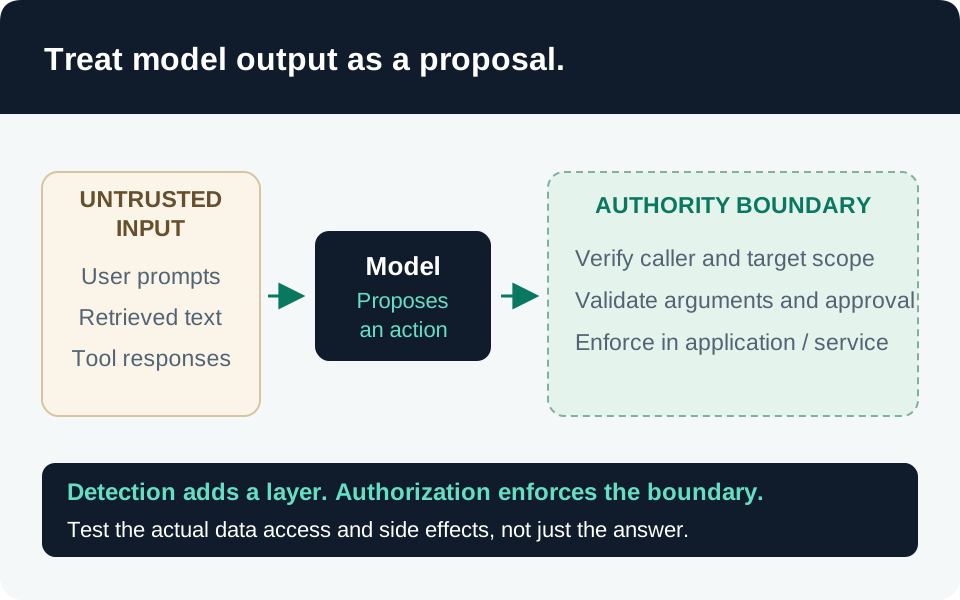
Prompt injection is an attempt to make an AI system treat untrusted content as instructions. A useful defense plan asks both whether the model follows the injected instruction and whether the surrounding application permits a harmful action. This guide is for application and agent builders using Microsoft Foundry or Azure AI Content Safety; it does not claim a universal configuration for Microsoft 365 Copilot.
Prerequisites and safety boundary
Use an authorized test environment, synthetic documents, nonproduction identities, and tools that cannot affect real customers. Record the model/deployment version, prompt template, retrieval pipeline, enabled tools, and protection configuration. Agree on prohibited outcomes before creating test cases. Keep the test corpus access-controlled when examples contain sensitive system details.
1. Map every source of instructions
List user input, retrieved pages, email, uploaded files, tool metadata, tool responses, memory, and handoffs to other agents. Identify which components choose retrieval targets and execute actions. Our recommended worksheet records each input’s origin, trust level, parser, protection step, and the authority available after it reaches the model.
Do not rely on the model to carry tenant identity correctly or enforce isolation. Microsoft recommends deterministic tenant context, authorization policies, resource boundaries, and tool-level checks. Evaluate authorization each time a tool runs, including after agent handoffs. Agent isolation guidance.
2. Configure detection and enforcement separately
Prompt Shields distinguishes user-prompt attacks from instructions embedded in document content. In Foundry, configured blocking can stop detected attacks before model processing. The standalone Azure AI Content Safety API returns detection results; your application must decide whether to block, exclude content, or escalate. The API is not itself an enforcement gateway. Prompt Shields behavior.
Verify the actual deployment assignment, intervention point, and action. Microsoft documents document-attack detection as off by default; enable it explicitly where required and distinguish the returned detected and filtered values. A document control cannot protect a retrieval path that never supplies the document for analysis. Supported agent tool-response inspection has preview scope; check your tool and configuration rather than assuming universal coverage. A negative detection does not establish that content is trustworthy or factually correct. Prompt Shields scope.
3. Limit the consequence of a missed attack
Allow only necessary tools, operations, resource scopes, and outbound destinations. Validate tool arguments outside the model, including destination identifiers. For consequential writes, bind an approval to the specific operation and target instead of accepting a broad conversational confirmation. Use the narrow identity and data boundaries recommended in Microsoft’s Azure AI security guidance.
Our recommended failure handling is explicit: decide what happens when a protection service times out or cannot evaluate an input. High-impact actions should not silently inherit approval from a detector error. Keep this decision versioned and test it independently of normal model responses.
4. Build a balanced test matrix
| Case | Evidence to inspect |
|---|---|
| Benign task and ordinary reference material | Task still completes without unnecessary blocking. |
| Instruction embedded in a retrieved document | Detector result, model behavior, and actual tool activity. |
| Tool response attempting to redirect the next action | Target selection and authorization remain constrained. |
| Attempt to access another user’s resource | Resource access is denied regardless of model wording. |
| Protection timeout or malformed response | Documented fallback occurs; prohibited actions remain unavailable. |
Repeat cases across supported languages and input formats, recording exact versions and outcomes. Check backend reads and writes, not only the final answer. A refusal message can arrive after an unauthorized retrieval; a detector hit can also represent a false positive.
Acceptance and ongoing work
Accept a release only when expected allow/deny behavior is demonstrated, failures have owners, and investigators can correlate an input with resulting actions. Report observed results without presenting a finite test set as proof of immunity. Retest after model, prompt, tool, retrieval, or policy changes. Use the incident response guide when a test reveals actual exposure or unauthorized side effects.
Go to the source