
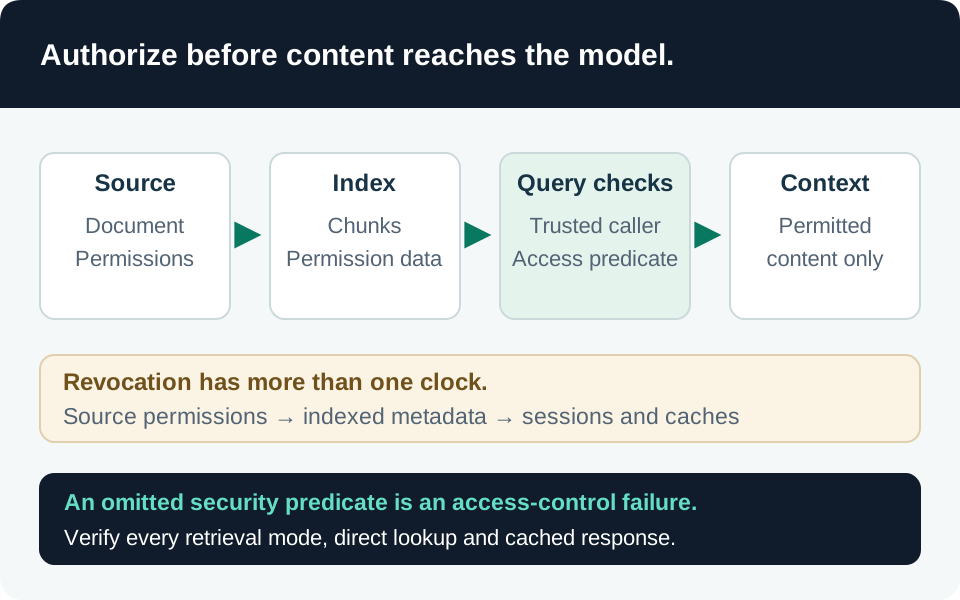
In retrieval-augmented generation, authorization must constrain the documents supplied to the model. Filtering the final answer cannot undo disclosure into prompts, traces, caches, or tool calls. This guide covers application-owned Azure AI Search retrieval, not Microsoft 365 Copilot’s native permission model. The architecture and tests are recommendations; no tenant behavior has been measured here.
Threat model and version boundary
Assume a user can request another team’s document, manipulate a retrieval argument, and obtain a valid application session. Also consider an omitted filter, a preview vector override, a chunk with incorrect permissions, and an index serving permissions that were revoked at the source. The model and browser are not trusted authorization components.
Microsoft distinguishes generally available security-filter patterns from preview native ACL, RBAC-scope, SharePoint, and Purview-label enforcement. The former performs string comparisons; the latter interprets supported identity and permission metadata. Microsoft’s Search preview terms do not recommend preview features for production workloads. Choose an approved path explicitly and pin API/SDK versions. Current native examples use 2026-08-01-preview; a stable client does not acquire those features merely because its index contains similarly named fields. Approach and release-status comparison.
Prerequisites and architectural choice
Inventory every queryable index, content source, permission owner, ingestion identity, and serving identity. Keep a known allowed document and known denied document for each representative user. Native ADLS and SharePoint ingestion require a billable Search tier, Basic or higher, plus their source-specific authentication configuration. Check source licensing, consent, and feature availability before promising equivalence with the original repository. ADLS prerequisites, SharePoint prerequisites.
Our design tradeoff is between isolation and operational complexity. Separate tenant indexes reduce the consequences of a missing tenant filter but increase deployment and capacity management. A shared index needs a mandatory tenant-and-document authorization predicate on every retrieval path. Native permission handling reduces custom resolution code, but adds preview restrictions and synchronization dependencies. None of these choices makes a stale source permission automatically current.
Give the serving identity read-only index access. Separate it from ingestion and investigation identities. Search Index Data Contributor can modify content and supports elevated reads; Search Service Contributor can manage objects and retrieve keys. A control-plane role must not be treated as harmless merely because it lacks direct document-query permission. Search role boundaries.
1. Implement the application-filter contract
For the GA security-filter pattern, store authorized principal identifiers in a Collection(Edm.String) field marked filterable. Microsoft recommends search.in for membership matching. Marking permission metadata retrievable: false reduces its appearance in responses; it is not field-level authorization. Search does not authenticate the principal strings in this pattern. Security-filter implementation.
Our required application contract is:
- Authenticate the request and derive tenant/user context from validated claims, following the delegated authorization guide.
- Resolve approved user/group identifiers through trusted application logic. Treat an unavailable or incomplete permission lookup as a controlled failure, not an empty filter meaning “all.”
- Build the mandatory tenant and principal predicate server-side using correctly escaped expressions. The caller may narrow business criteria but cannot replace the security predicate.
- Apply it before results enter model context, including source-title lookup, citations, related-document retrieval, and cached-result reuse.
Do not expose an index-wide query credential to the browser. A user with direct Search access can bypass an application-only predicate. Likewise, a direct document-key lookup must go through an authorization-aware adapter rather than become an unfiltered shortcut.
2. Make keyword, vector, and hybrid paths agree
Vector security filters operate on filterable nonvector metadata, not the numeric vector itself. preFilter applies the predicate during vector traversal; postFilter can return fewer authorized matches or false negatives at small k. Strict postfiltering remains preview. This is a relevance/latency tradeoff, not a reason to remove permission checks when results are sparse. Vector filter semantics.
Hybrid queries run keyword and vector searches together. A particularly important preview feature, vectorQueries.filterOverride, replaces the top-level filter for that vector subquery. Microsoft explicitly requires mandatory security filters in both the global filter and every override. Prefer disallowing overrides in the public request contract unless your adapter reliably composes the full predicate. Hybrid filter overrides.
Test keyword-only, vector-only, hybrid, and semantic-result variants separately. Do not infer that a passed keyword test proves the vector branch is constrained. Include captions, answers, facets, counts, and citation metadata in leakage tests where the application exposes them.
3. Configure native permission enforcement deliberately
For native preview enforcement, enable permissionFilterOption and mark the appropriate filterable permission fields. Custom ACL ingestion uses Entra object IDs rather than email addresses. Supply the documented user token through x-ms-query-source-authorization, alongside request authentication. Permission categories such as user, group, and RBAC scope are alternative grant paths; they are not an automatic intersection of restrictions. Native query enforcement.
The documented current behavior without a user token is public content only, not unrestricted protected content. Our recommendation remains to reject missing user context for a protected application route. If ACL evaluation fails, Search returns an error rather than partial filtered results; the application must not retry as an elevated reader. Keep x-ms-enable-elevated-read out of user-controlled headers and ordinary serving credentials. Failure and elevated-read behavior.
Do not assume every source permission model is reproduced. ADLS preview does not evaluate Azure ABAC and excludes some ACL identity categories. SharePoint preview excludes guest access and organization-wide/Anyone sharing links; mixed Entra groups nested inside SharePoint groups are unsupported. Its ingestion requires application permissions, while query enforcement uses the user’s context. Review the scenario-specific Graph/SharePoint consent and federated-credential requirements rather than granting a copied global permission set. ADLS limitations, SharePoint support matrix.
4. Preserve permissions through ingestion and revocation
Every returned chunk needs the source item’s effective permission metadata. With chunking, configure index projections; parent field mappings alone do not populate a child-only index. The documented native ADLS/SharePoint paths do not preserve permissions through Custom Web API skills, knowledge stores, enrichment caches, or debug sessions. Treat an incompatible pipeline as an architecture issue requiring a supported design, not an optional warning. Permission inheritance limitations.
Define an authorization-freshness objective separately from content freshness. ADLS permission-only changes require an explicit refresh mechanism. SharePoint item-level unique ACL changes are picked up on successful runs in newer preview versions, but inherited parent-scope changes need resync or targeted reprocessing. An unchanged document body does not prove unchanged access. ADLS refresh, SharePoint refresh.
Our recommended ingestion gate quarantines documents with missing or unsupported permission data and prevents partially populated chunks from entering the serving index. During a known revocation gap, block the affected corpus or use a verified additional source authorization check. Record the tradeoff between temporary unavailability and continued stale access.
Acceptance matrix and troubleshooting
| Case | Required result |
|---|---|
| Permitted user and document | Relevant authorized chunks returned with expected source IDs |
| Excluded user, exact secret phrase or document ID | No protected text, title, citation, or cached answer |
| Wrong tenant or caller-supplied group IDs | Rejected or ignored in favor of trusted context |
| Keyword, vector, hybrid, and vector override | Identical authorization boundary across all branches |
| Missing token or permission-resolution failure | Protected route fails closed; no elevated fallback |
| New chunk missing required ACL metadata | Publication blocked; no accidental public classification |
| Item and inherited-parent permission revocation | Denial after verified refresh, with measured stale interval |
| Attempted elevated-read header | Ordinary serving identity cannot bypass document permissions |
Retain index/schema version, source and chunk IDs, policy version, test identity, UTC time, request ID, and sanitized result. For missing results, distinguish ingestion from group resolution and query filtering. An authorized investigator may compare elevated and filtered reads in a restricted diagnostic path; never return the elevated result to the end user. SharePoint troubleshooting.
Finally, authorization proves who may read a document, not whether it is trustworthy. Pair this design with RAG ingestion integrity before treating authorized content as reliable grounding.
Go to the source
References & further reading
- Microsoft Learn — Document-level access control in Azure AI Search
- Microsoft Learn — Security filters for trimming results
- Microsoft Learn — Query-time ACL and RBAC enforcement
- Microsoft Learn — Connect to Azure AI Search using roles
- Microsoft Learn — Create a hybrid query
- Microsoft Learn — Add a filter to a vector query
- Microsoft Learn — ADLS Gen2 permission metadata ingestion
- Microsoft Learn — SharePoint permission metadata ingestion
- Microsoft Learn — Troubleshoot SharePoint permission filtering