A password reset does not remove an application’s consent grant. An attacker can seek authorization for an application instead of stealing the user’s password. Microsoft describes phishing and manipulated websites as ways to obtain this authorization, then access permitted data through the app. Recovery must address the application and its permissions. Microsoft’s illicit-consent guidance.
This dossier covers Microsoft Entra application consent affecting organizational resources, including connectors used by AI assistants. It is established technique guidance, not a named threat-actor campaign or a CVE advisory. The November 3, 2026 evidence date is the response playbook’s update date; November 13 is this documentation review. Neither is an asserted discovery date. Microsoft response playbook.
Model the authorization accurately
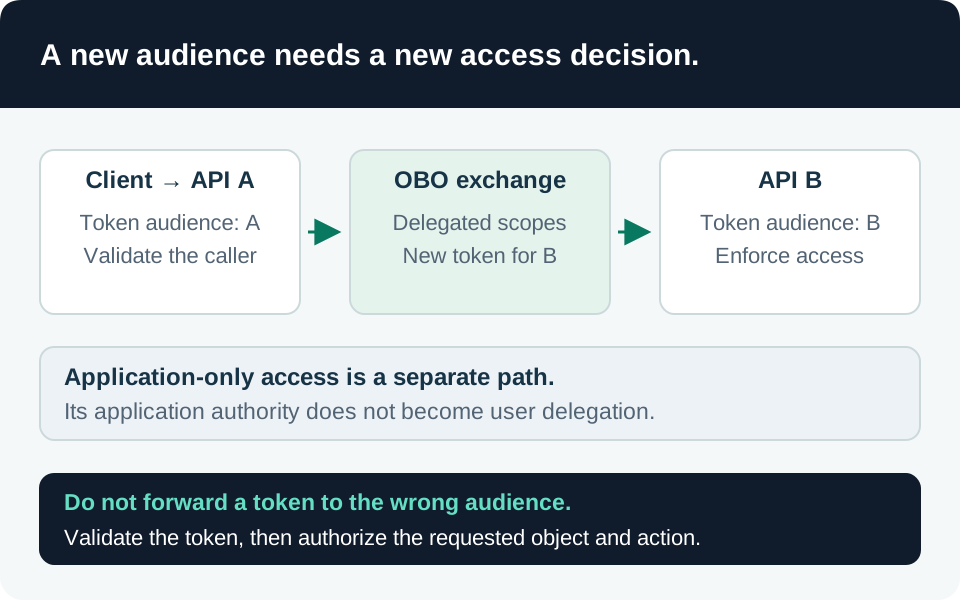
Delegated access acts on behalf of a user and requires both the client and user to be authorized. App-only access uses the application’s identity without a signed-in user. Similar permission names can therefore represent different exposure. Record the permission type, target API and grant scope before estimating impact. Microsoft permission model.
Our recommended investigation record distinguishes the application/client ID from the tenant-local service-principal object ID. Include the publisher tenant, resource service principal, consenting principal, grant identifier and affected user scope. Display names are useful labels but poor correlation keys: two objects can have similar names, and a name can change.
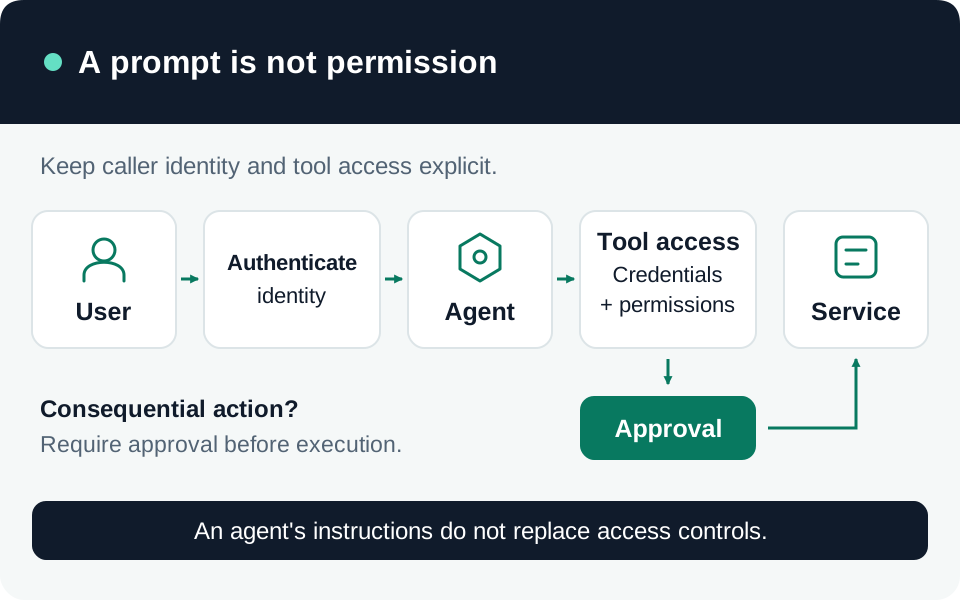
The failed boundary is an authorization decision: an apparently useful application receives access that the business did not intend. MFA protects authentication but does not prove a consent decision is appropriate. For AI integrations, evaluate the underlying connector grant separately from the assistant’s friendly description or instructions about using data responsibly.
Prevent the next grant and inspect the old ones
Restrict future user consent. Microsoft supports limiting it to verified publishers and selected low-impact permissions, or using a more restrictive policy with an approval workflow. Changing the policy affects future consent operations; existing grants remain. Before programmatic changes, retrieve the current authorization policy and preserve unrelated owned-resource consent assignments. User-consent policy behavior.
Our recommendation is to version the approved policy and test both an allowed low-impact request and a blocked excessive request. Document the administrator who owns exceptions and the business deadline for review. Publisher verification is an identity signal, not a substitute for deciding whether the requested access is justified.
Make approval a resource decision. Microsoft’s consent-review guidance calls for understanding the app, publisher and permissions before tenant-wide approval. Enable a supported request workflow and teach reviewers what they are authorizing. Popularity or a high count of previous user grants is not sufficient justification. Consent evaluation guidance.
Our suggested approval record names the business owner, data owner, purpose, permission type, accessible resources, vendor security contact and review expiry. Compare a mailbox-wide request with the actual task. When an application needs one bounded workflow, require the owner to explain why a narrower supported authorization cannot meet it.
Audit the accumulated state. Export existing delegated grants and application permissions, then reconcile them with approved integrations. Prioritize broad data access, privileged administration, unknown owners and applications that no longer serve a business purpose. Keep legitimate automation owners involved before containment of an uncertain finding, while allowing the incident process to disable a confirmed malicious app promptly.
Reconstruct the chain with reliable identifiers
Microsoft’s application-security guidance recommends monitoring consent, privileged permissions, credentials, owners and other application configuration changes across audit and sign-in evidence. Review these together: a legitimate grant followed by an unexpected owner or credential change can require a different investigation from a newly consented malicious app. Application monitoring guidance.
Use the linked consent hunt to collect successful consent and permission-change events. Its seven-day window and 200-result cap are investigation limits, not a complete inventory. The credential and owner hunts provide related change context. The resource-expansion hunt examines established service-principal sign-ins; it excludes identities absent from its prior baseline and cannot prove data reads or newly granted permissions.
Our recommended correlation sequence is grant or configuration change, token activity, then resource-level access where available. Separate delegated user sign-ins from app-only workload sign-ins. Preserve raw event IDs and target properties before normalizing them. One suspicious app name, unfamiliar IP address or admin-consent flag should initiate investigation, not trigger an unsupported attribution.
Document what the logs cannot establish
Check collection start time, source licensing, actual retention, ingestion delay, table availability and query permissions before assigning a negative finding. Microsoft’s playbook warns that unavailable historical audit data prevents reconstruction. Retaining a grant inventory helps establish current exposure but cannot reconstruct every past resource request. Investigation evidence requirements.
Our recommendation is to record three outcomes separately: unauthorized permission confirmed, unauthorized resource access confirmed, and data disclosure confirmed. A successful token request supports none of those conclusions by itself. Where resource-level events are missing, describe the maximum permitted exposure and the evidence gap without presenting that maximum as proven theft.
Contain and verify recovery
For a confirmed malicious app, Microsoft’s playbook recommends disabling the enterprise application and reporting it to Microsoft. Disabling stops new token acquisition and further sign-in or consent; deletion alone can allow the app to return through another consent. This does not justify assuming every previously issued access token is instantly unusable. Microsoft containment sequence.
Revoke the actual delegated grants and application permissions using the appropriate supported interface and least-privileged administrative role. Portal support differs for user and admin grants. Also inspect other authorization systems, including directory roles, Exchange RBAC and Teams resource-specific consent; removing an OAuth grant does not inventory those automatically. Prevent re-consent as part of recovery. Permission review and revocation.
The following is our proposed recovery matrix, to be tested with a controlled application and synthetic data:
| Check | Required evidence |
|---|---|
| Existing grant removal | Identified delegated grant or application assignment is absent on re-read. |
| New authorization | Test request is blocked or enters the intended approval workflow. |
| Application containment | Disabled state is verified; new authentication attempts fail as expected. |
| Previously issued access | Resource behavior is checked through the applicable token lifetime and revocation model. |
| Alternate permissions | Directory and resource-specific assignments reviewed, with findings resolved. |
| Monitoring | Test events arrive, are queryable and retain stable application/resource identifiers. |
Preserve evidence before deleting objects or credentials. Rotate exposed secrets and investigate consenting users when evidence supports account compromise, while keeping those actions distinct from grant removal. Close the case only after application access, re-consent prevention, affected-data assessment and monitoring gaps have named owners and verified outcomes.
Trace the evidence
Primary intelligence & product guidance
- Microsoft Learn — App consent grant investigation ↗
- Microsoft Learn — Detect and remediate illicit consent grants ↗
- Microsoft Learn — Permissions and consent in the identity platform ↗
- Microsoft Learn — Configure user consent ↗
- Microsoft Learn — Evaluate application consent requests ↗
- Microsoft Learn — Review and revoke application permissions ↗
- Microsoft Learn — Security operations for applications ↗