Reprompt is a patched research disclosure about personal-account Microsoft Copilot. Varonis explicitly excludes enterprise Microsoft 365 Copilot from this particular issue. Do not convert the shared product name into an enterprise exposure finding. The research does not establish compromise of a reader’s account, and this dossier makes no claim of an active campaign. Original Varonis report.
Resolve product scope before choosing controls
Record the account type, application, entry URL, device and experience used in the reported event. A work-managed laptop can still be used with a personal Microsoft account. Conversely, a Copilot-branded application does not prove that a session uses personal-account privacy settings. Microsoft’s current guidance distinguishes Microsoft accounts from organizational Entra accounts and separates Copilot in Microsoft 365 home applications. Current Microsoft scope guidance.
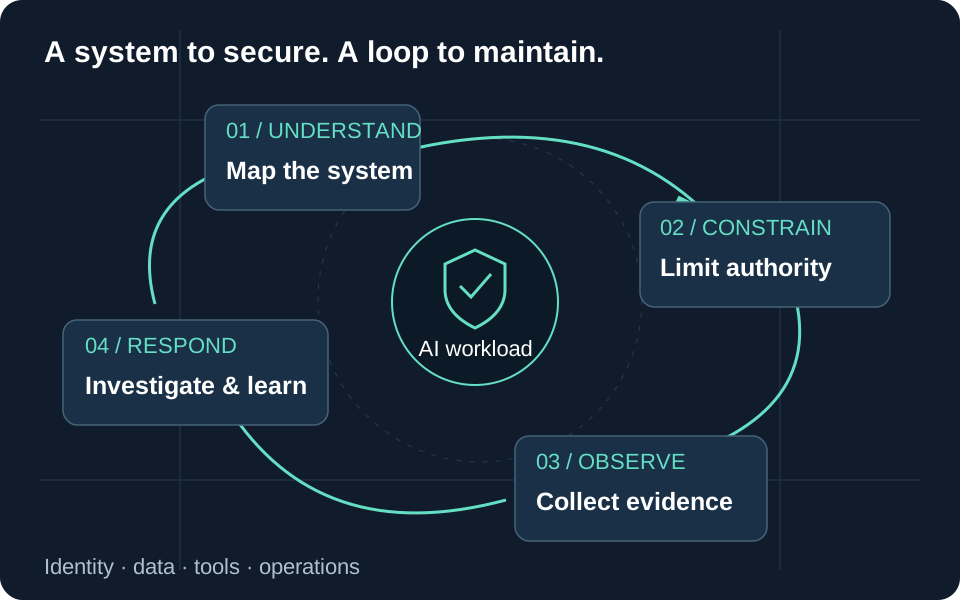
Our recommended inventory is session-oriented: identify where sensitive organizational information is allowed, where it is prohibited, which administrator can enforce that boundary, and which evidence is actually available. Document an exception when staff need personal AI services for an approved purpose. Give the exception a data limit and an expiry, rather than relying on users to infer different protections from similar interface names.
What the research demonstrated
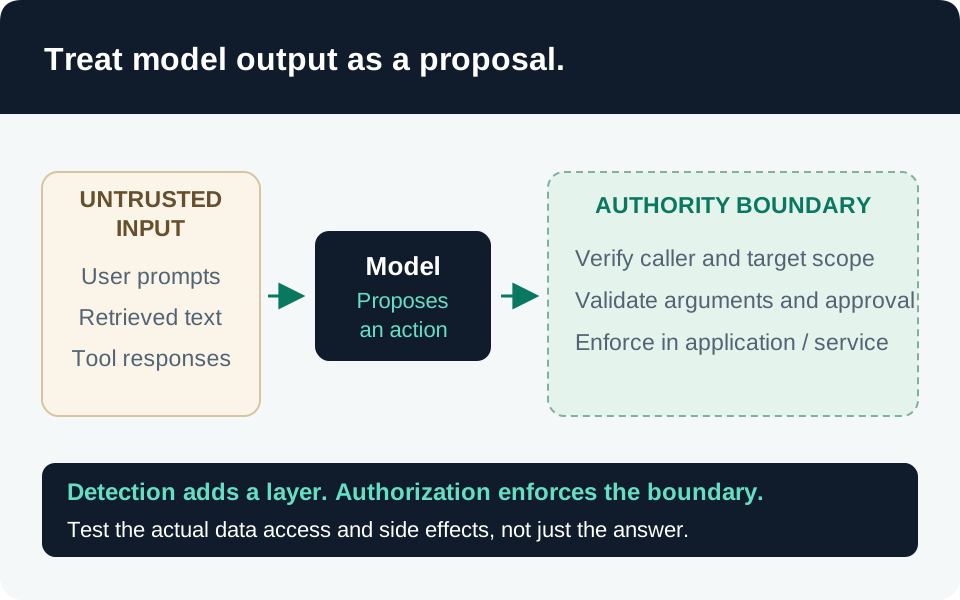
The described chain converted a link parameter into a prompt and accepted follow-up instructions from an attacker-controlled server. Varonis reported one-click initiation without a connector or plugin and continuing activity after the chat closed. Inspecting only the initial browser-visible prompt therefore did not reveal the whole sequence. Reprompt mechanism.
Our architectural inference is that navigation permission, instruction authority and authorization for later actions must remain separate. For an assistant your organization builds, require an explicit user task, evaluate every tool action against that task, and treat retrieved responses as data. A permitted first request must not authorize an unbounded continuation. These are engineering recommendations for analogous systems, not instructions for configuring Microsoft’s internal orchestration.
Evidence chronology and present-day limits
| Date | Supported interpretation |
|---|---|
| June 15, 2026 | The Varonis page adds a reference to the separate SearchLeak research; it must not be folded into Reprompt’s product scope. |
| June 16, 2026 | Date displayed on the report version reviewed here; the original disclosure day is not verified by this dossier. |
| August 18, 2026 | Microsoft’s support documentation identifies an updated personal Copilot experience with different applicable guidance. |
| November 13, 2026 | Sources and current defensive recommendations reviewed; no exploit reproduction or tenant test performed. |
The evidence date identifies the source version, not the beginning of a campaign. A service fix and a later interface change also do not establish that every future prompt-injection failure is eliminated. Varonis source chronology, Microsoft version applicability.
Prioritize practical hardening
Make the account boundary visible. Our recommended onboarding exercise asks employees to identify their signed-in account before adding data. Provide an approved work entry point and a clear route for reporting an unexpected prompt. On managed devices, evaluate browser and application restrictions through the normal endpoint change process. Test required personal-account exceptions so staff are not driven to an unmonitored workaround.
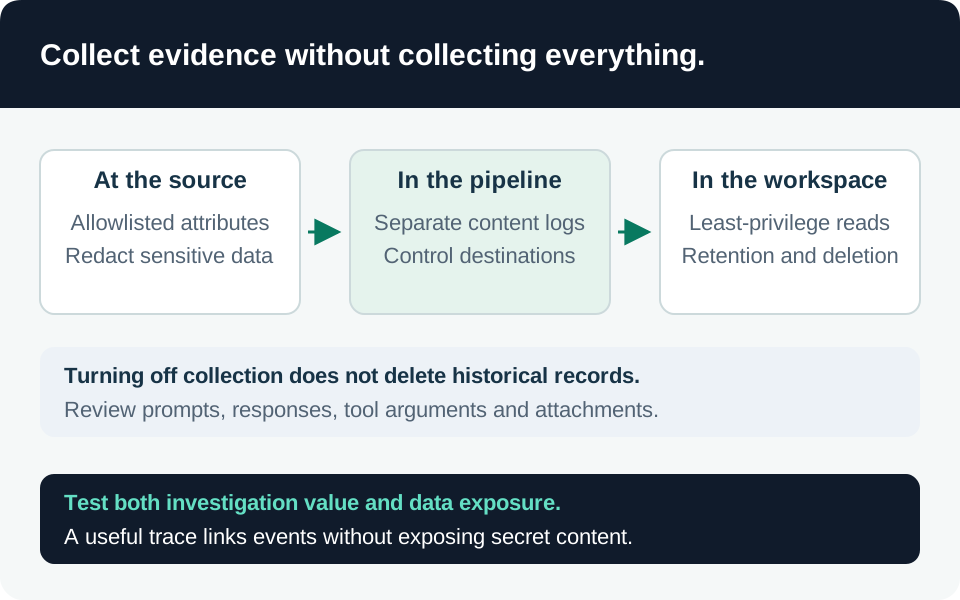
Reduce unnecessary context. Current personal Copilot settings expose controls for saved memories, shared experiences, chat history and web search. Turning off saved memories does not itself delete existing memories. Use the instructions for the installed experience; the legacy support page has different behavior. Current personal privacy controls.
Our recommendation is to remove unnecessary sensitive material through the appropriate privacy controls after preserving evidence when an incident is suspected. Record separate decisions for saved memory, past conversations and future personalization. Do not present disabling model training, deleting a chat or changing an advertising preference as a prompt-injection fix. Data minimization reduces potential impact; it does not prove a service has no vulnerabilities.
Treat unsolicited AI links as a task-authorization concern. Teach employees to open their approved service entry point and formulate the intended task themselves when a message unexpectedly launches an assistant. A familiar domain is not proof that the supplied instructions are wanted. Report suspicious messages through the organization’s existing process; do not forward active links into public chat channels for analysis.
Check the response path. Assign support ownership for personal-account incidents encountered on work devices. State what the organization can investigate and what requires the account holder or Microsoft. This prevents an enterprise administrator from promising access to consumer-service records they do not possess.
Detection that respects the visibility gap
Our suggested triage begins with the original message and full URL preserved as restricted evidence, browser timestamps, the signed-in account, any available conversation export, and existing endpoint or network alerts. Redact sensitive URL parameters in ordinary tickets; retain the original separately with access controls. Document collection times and time zones before attempting correlations.
A browser or proxy can observe only the events its configuration collects. It cannot establish the complete server-side execution history merely by showing an initial navigation. Likewise, absence of an unusual device connection does not establish that no cloud-mediated disclosure occurred. Escalate specific unanswered questions to the service provider instead of inventing a local indicator.
Microsoft’s enterprise Copilot audit documentation describes organizational Purview records and content access. It does not establish that a consumer session appears in that tenant’s audit trail. The existing Sentinel library has no personal Copilot collection or Reprompt detector, so no query is attached here. The related guides offer general defense and investigation practices; their enterprise telemetry examples do not become personal-account capabilities. Enterprise audit scope.
Rehearse containment without replaying an exploit
| Exercise | Acceptance evidence |
|---|---|
| Identify account context | Analyst distinguishes personal account, organizational account and home-app experience. |
| Preserve a harmless link report | Original destination and timeline retained without publishing sensitive parameters. |
| Review privacy settings | Current settings and retained memories checked separately; version recorded. |
| Request provider help | Support request lists known facts, missing server-side evidence and relevant timestamps. |
| Verify containment | Follow-up checks confirm intended session and data-handling changes rather than assuming instant completion. |
If unauthorized account access is suspected, follow Microsoft’s account-security process. Its sign-out-everywhere guidance allows up to 24 hours and excludes Xbox consoles; record those limitations in the containment plan. Closing a tab is not a substitute for account remediation. Microsoft account sign-out guidance.
Our recovery criteria are evidence preservation, a documented assessment of disclosed information, rotation of any exposed secret, and confirmation of the intended account controls. Separate confirmed disclosure from potentially accessible context. Share only the necessary organizational impact assessment with the business owner, and retain unresolved provider-side questions explicitly in the incident record.
Trace the evidence
Primary intelligence & product guidance
- Varonis Threat Labs — Reprompt ↗
- Microsoft Support — Copilot for individuals: data, privacy and responsible AI ↗
- Microsoft Support — Copilot for individuals: privacy controls and choices ↗
- Microsoft Support — Sign out of your Microsoft account everywhere ↗
- Microsoft Learn — Data protection and auditing for Microsoft Copilot ↗