
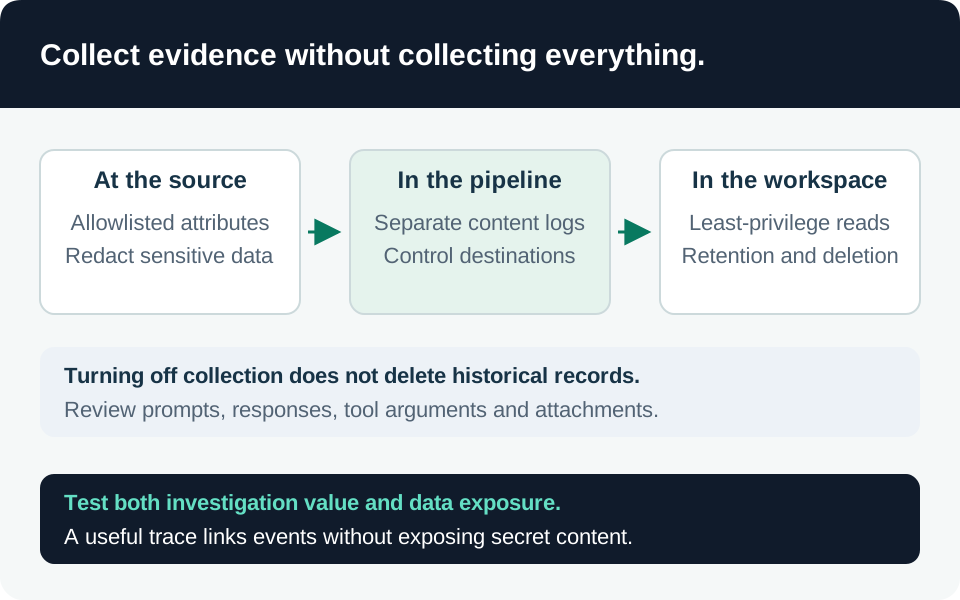
An AI trace can become a second document repository: prompts, retrieved passages, tool arguments, and evaluation explanations may all contain protected information. The security objective is to reconstruct who was authorized to do what and what actually happened without copying every conversation into a broadly readable workspace. This guide defines a recommended telemetry contract and validation process, not a claim of tenant-level privacy testing.
Start with investigation questions
List the decisions an investigator must answer: which identity initiated the request, which authorization policy was evaluated, which corpus or tool was used, whether an action was approved, and whether the destination committed it. Map each question to the minimum event fields required. Record identifiers and outcomes before deciding to collect bodies.
Our proposed standard event includes directory and principal identifiers, application release, trace/span IDs, resource scope, policy version, decision reason, tool operation name, approval reference, destination request ID, and final outcome. Keep identity keys explicitly typed: a workspace ID, internal actor ID, and Entra object ID are not interchangeable merely because they look like GUIDs.
| Evidence class | Default treatment | Reason |
|---|---|---|
| Authorization decision and policy version | Retain structured fields | Reconstruct the boundary that was applied |
| Tool name, target identifier, outcome | Retain minimized metadata | Connect intent to an observable side effect |
| Access token, API key, SAS query string | Exclude | Avoid creating reusable credentials in logs |
| Prompt, response, retrieved text | Collect only under a defined need | These fields can replicate protected source data |
| Debug exception or serialized request | Apply the same contract | Error paths often bypass normal instrumentation |
Understand what the platform collects
Foundry tracing can capture user inputs, model output, tool activity, and execution metadata. Connecting Application Insights enables tracing for agents in the project, and access to the telemetry resource can expose that content. Disabling tracing stops future collection but does not remove previously retained records. Review both Foundry and telemetry-resource access. Tracing data handling.
Inspect the actual SDK, exporter, server-side tracing configuration, and deployment environment. Do not assume one application flag disables every instrumentation path. Generate a synthetic request and inspect nested spans, exceptions, dependencies, custom events, application logs, and any forwarded copies. Microsoft recommends minimizing or redacting sensitive data before it reaches telemetry. Agent tracing setup.
Protect content that must be retained
The dedicated AppGenAIContent protection workflow is preview. It separates specified generative-AI content attributes and requires the table’s protection level plus appropriate privileged read authorization; merely moving content to that table does not establish the desired access boundary. Microsoft documents a September 30, 2026 migration for newly ingested attributes, with a temporary opt-out and historical rows remaining in their former tables. Custom roles with protected-table data actions also require review. Sensitive-trace controls and migration.
Our deployment gate therefore checks actual routing, protected-table configuration, inherited/custom permissions, and old data independently. Test a normal monitoring reader and an approved content investigator through both the Foundry UI and the workspace query path. Where preview functionality is outside organizational policy, avoid collecting sensitive content or use an approved separate evidence store with equivalent tested restrictions.
Grant exceptional content access for an identified investigation and limited interval. Keep exported evidence under its own retention and access policy; revoking workspace access does not retrieve a previously downloaded file. Use a deliberate procedure for legal preservation rather than silently extending every diagnostic trace forever.
Minimize before ingestion where possible
Our preferred application pattern allowlists structured fields and replaces free-text error details with controlled reason codes. A hash of a short secret or predictable identifier is not automatically anonymous; assess whether it can be guessed or linked. Use keyed pseudonymous identifiers where correlation is needed and keep the reidentification authority separate.
Azure Monitor ingestion transformations can filter or modify supported incoming tables, but they act after data reaches the service. Workspace transformations do not apply identically to every collection path, and multi-stage transformations are a separate preview capability. Verify source/table support and the effective DCR rather than assuming a workspace rule protects all exporters. Transformation scope.
Do not remove the fields required to distinguish denial from failure, success from retry, or one tenant from another. Security evidence and payload minimization need a joint contract. Sampling can support performance diagnosis but cannot guarantee a complete audit of every privileged action; keep a separate reliable action record where completeness is required.
Acceptance tests and evidence
Use unique synthetic markers instead of real personal information or credentials. Insert markers into a prompt, tool argument, retrieved passage, exception, and URL query string. Search each intended destination and export path after the expected ingestion delay.
| Test | Required result |
|---|---|
| Normal successful action | Identity, policy, approval, and destination outcome correlate |
| Failed tool call or retry | Error path follows the same minimization rules |
| Synthetic secret in a request | No retained token value or SAS query string |
| Standard reader requests protected content | Access is denied while permitted operational metadata remains usable |
| Historical traces before routing migration | Earlier copies are identified and handled explicitly |
| Content capture disabled | New sensitive payloads stop; old retention is assessed separately |
| Export or incident attachment | Content remains governed outside the original workspace |
Repeat these checks after instrumentation upgrades, schema migrations, and new tools. Keep the results with the telemetry baseline and use the correlation engineering guide to preserve investigative value without indiscriminate content capture.
Go to the source