
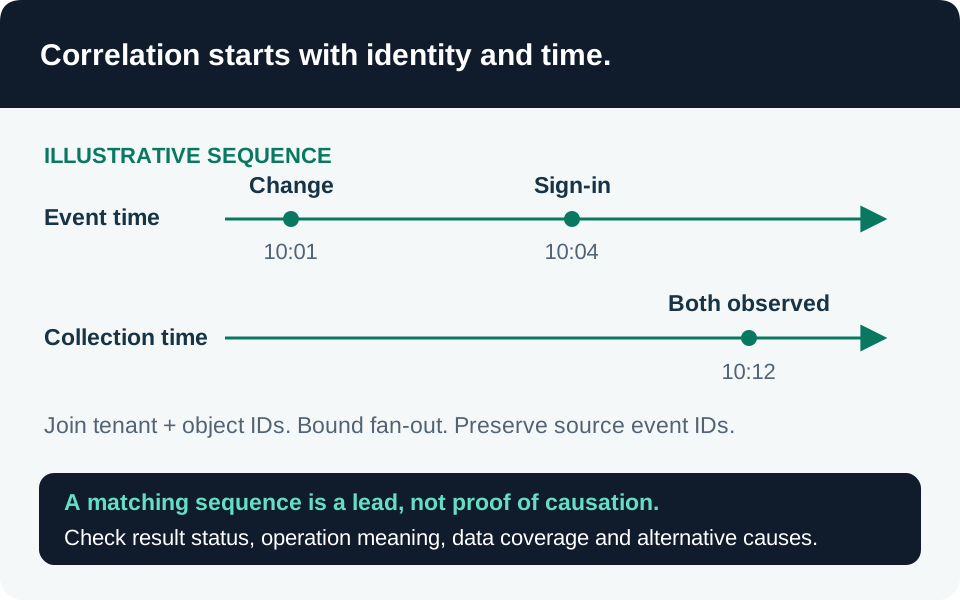
A sign-in, an Azure change and a Copilot event near one another can support an investigation. Their proximity does not establish that the same identity performed the same action, or that an AI system caused the change. Correlation engineering makes those assumptions explicit and tests them before a query becomes an operational rule.
Scope, prerequisites and hypothesis
This guide addresses KQL in a Microsoft Sentinel Log Analytics workspace and the scheduled analytics-rule execution model. It does not depend on a preview feature; the optional future “start at a specific time” setting is separately marked preview and is unnecessary here. Custom detections and near-real-time rules have different execution contracts, so do not copy this scheduling logic into them without reviewing their requirements. Scheduled rule scope.
Confirm connector coverage, query permissions, table plans supporting the intended joins, retention, transformation behavior and representative volume. Rule creation requires the documented Sentinel/workspace write permissions; ordinary hunting should use appropriately limited read access. Rule prerequisites.
Start with a falsifiable hypothesis: “A principal with an unusual successful sign-in subsequently changed an AI resource’s configuration.” Define what counts as unusual, which resource operations matter, the permitted time gap and the evidence needed to attribute the actor. Treat approved automation, emergency changes, roaming users and service-principal activity as competing explanations, not inconvenient rows to discard.
Establish an identity and event contract
For each input, document one row’s meaning, its event identifier, source timestamp, directory scope and actor representation. Do not equate similarly named fields across tables.
| Source | Useful fields | Boundary to verify |
|---|---|---|
SigninLogs |
AADTenantId, UserId, AppId, Id, CreatedDateTime, TimeGenerated |
User object, client application and event identifier represent different things |
AzureActivity |
Caller, Claims_d, EventDataId, CorrelationId, ResourceId, TimeGenerated |
The caller is not necessarily the principal granted access or the resource owner |
CopilotActivity |
OrganizationId, ActorUserId, ActorName, RecordId, TimeGenerated |
ActorUserId can be an internal key or GUID; validate its relationship to Entra identity |
These fields come from the sign-in, Azure Activity and Copilot audit schemas. In AzureActivity and CopilotActivity, TenantId is documented as the Log Analytics workspace ID, not the organization’s Entra directory ID.
Build a normalized actor key only after verifying the source semantics. Preserve directory/organization scope and stable object identifiers where available. Keep an explicit unresolved bucket for absent or ambiguous mappings. Do not join empty identifiers together, infer identity from a display name, or treat shared egress IP as a unique person. Where a UPN mapping is unavoidable, record its source and validity interval; renames and guest identities can invalidate a convenient string match.
Choose grain before choosing a join
Decide whether the output represents an event pair, a resource change, an actor/time window or an incident candidate. Retain the source identifiers needed to reconstruct each result. One actor with ten sign-ins and twenty changes can create two hundred candidate pairs before a time constraint is applied; that is not two hundred independent suspicious actions.
Specify the join kind. Kusto’s default is innerunique, which deduplicates the left input by join key. That can discard meaningful left-side events if the key is merely the actor. An explicit inner preserves matching combinations but can multiply rows. Neither choice automatically deduplicates source events. Join semantics.
A defensible implementation sequence is:
- Bound each source by the required history and target population; reject unusable keys.
- Deduplicate retransmitted source records by their documented event identity within source scope. Preserve distinct lifecycle events unless the hypothesis explicitly consolidates them.
- Project only the fields needed for attribution, time constraints and investigation.
- Join on the verified actor/resource keys using an explicit flavor.
- Require the later event to occur after the earlier event and within the declared correlation interval.
- Reduce to the chosen output grain, preserving bounded source-ID examples and counts with accurate names.
Push selective filters ahead of parsing and joins. Measure input and output cardinality before adding execution hints; a faster incorrect join is still incorrect. Avoid truncating one side with take before correlation, which can silently remove the event that would establish the match. KQL performance guidance.
Separate event ordering from ingestion scheduling
Use the documented source-time semantics for behavioral order. ingestion_time() approximates when a row became queryable; it can be null where ingestion-time policy was unavailable and cannot reliably order overlapping ingestion operations. Preserve both timestamps when investigating delay. Ingestion-time limitations.
For a single-source scheduled rule, Microsoft’s delay pattern enlarges the event-time lookback and restricts ingestion to the current run interval. It reduces missed delayed records and repeated evaluation across overlapping windows. Measure delay for every participating source instead of borrowing one fixed allowance. Scheduled-rule delay handling.
A multi-source join needs more thought: restricting both sides to recently ingested rows can miss a pair when its members arrive in different runs. Define an anchor, such as a newly arrived configuration-change event, and search retained sign-in history around that anchor. Then test the reverse arrival order: if the sign-in arrives later, the first anchor run may still miss it. Choose a documented reconciliation window or replay process for those cases, with a stable candidate key to manage duplicates. This is an engineering design decision, not an exactly-once guarantee from an ingestion filter.
Align the rule’s configured lookback with all event-time filters and return an intentional TimeGenerated value for the result. The rule engine uses that column for its lookback. Keep original timestamps separately rather than replacing them and losing provenance. Rule query contract.
Validate the rule, not just the query
Static syntax/schema checks establish that expressions resolve against the supplied schema. They cannot establish data coverage, latency, normal activity, attribution correctness or useful alert volume. Test first with a small synthetic dataset that has known expected pairs, then with authorized representative workspace data.
| Test | Expected behavior | Evidence |
|---|---|---|
| Same actor, correct order, allowed gap | One candidate at the defined grain | Original IDs and event times |
| Same name, different directory/object | No identity-based correlation | Normalized keys and exclusion |
| Empty or ambiguous actor | Explicit unresolved outcome | Missing-key counts |
| Duplicate source record | No inflated action count | Deduplication key and retained event |
| Many events for one actor | Controlled cardinality | Input, pair and final-result counts |
| Either source arrives late | Documented detection or reconciliation | Event/ingestion times and run IDs |
| Events outside order/window | No match despite shared identity | Boundary-case expectations |
| No data or failed rule execution | Health failure distinguished from quiet activity | Connector and rule-health evidence |
Select alert thresholds and grouping based on the final row grain. Map entities using supported identifiers, preserving the distinction between actor, application and affected resource. A strong identifier is preferable to a display label; confirm how the resulting entity resolves in the investigation interface. Entity mapping identifiers.
Use rule simulation to inspect historical result volume, then validate actual scheduled execution and analyst workflow. Simulation over retained data cannot reproduce every historical arrival delay or prove detection coverage. Keep the operational rule separate from a hunting query’s convenience limits and analyst-selected time range.
Diagnose gaps and keep evidence
When results disappear, inspect each input independently: table coverage, freshness, retained interval, key population, filters and then joins. When counts explode, inspect key collisions, lifecycle duplication and many-to-many matches before raising thresholds. When a hunt matches but a rule does not, compare its effective time range, returned TimeGenerated, execution permissions and rule health.
Enable the appropriate health/audit feature before expecting SentinelHealth and SentinelAudit evidence; those records describe rule execution and configuration changes. Assign an owner for failures and unauthorized edits. Rule health and integrity.
Retain the hypothesis, schema contract, known-case results, latency measurements, query/rule revision and triage guidance. This article is documentation-reviewed and has not been tenant-tested. Its acceptance matrix is work to perform before adopting a correlation as a production detection.
Go to the source
References & further reading
- Microsoft Learn — SigninLogs table schema
- Microsoft Learn — AzureActivity table schema
- Microsoft Learn — CopilotActivity table schema
- Microsoft Learn — Kusto innerunique join
- Microsoft Learn — KQL query best practices
- Microsoft Learn — Kusto ingestion_time function
- Microsoft Learn — Handle Sentinel ingestion delay
- Microsoft Learn — Scheduled analytics rule behavior
- Microsoft Learn — Create scheduled analytics rules
- Microsoft Learn — Sentinel entity identifiers
- Microsoft Learn — Analytics rule health and integrity