
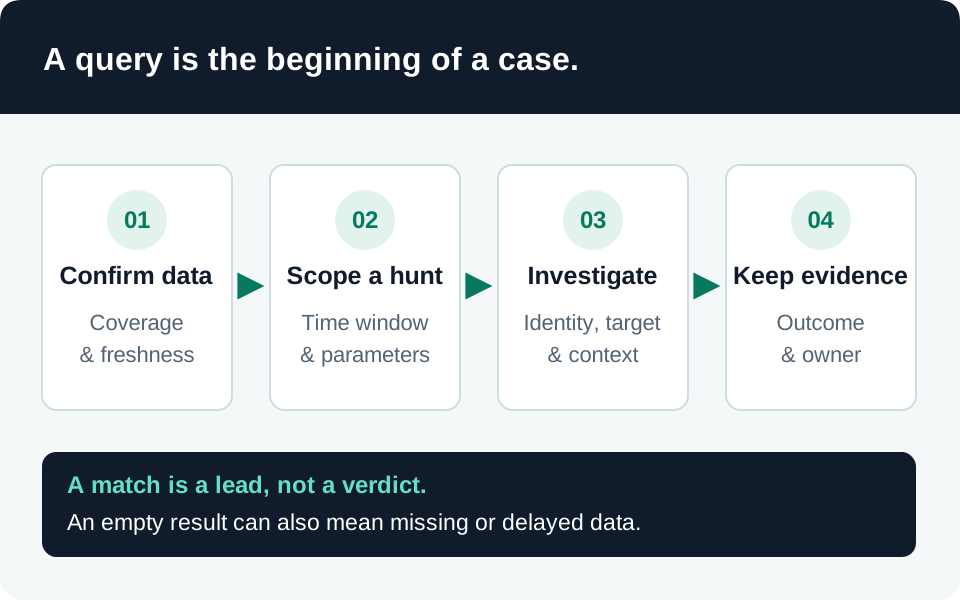
A useful telemetry baseline proves which questions you can answer, where the evidence lives, and what remains invisible. This guide connects Azure AI resource logging, Microsoft 365 Copilot auditing, and Copilot Studio activity. It is a recommended implementation sequence, not a claim that any tenant or connector has been tested.
Prerequisites and collection boundaries
Identify the tenant, subscription, resource IDs, agent IDs, operating regions, and deployed channels. Arrange authorized access to configure collection and separate access to investigate it. Name the destination owner, retention owner, and person approving sensitive-content collection. Record licensing and ingestion costs before enabling broad exports.
Do not assume a Sentinel workspace contains every Microsoft AI event. Product auditing, export or connector configuration, destination permissions, and query schema are separate dependencies. Keep the native source available as a comparison point while onboarding a new feed.
1. Define the evidence contract
For each security question, agree on the minimum fields and their source. Our recommended starting contract is:
| Question | Required evidence |
|---|---|
| Who changed an AI resource? | Actor, target resource, operation, event time, outcome, and change correlation. |
| Which identity accessed data? | User or workload identity, resource identifier, authorization result, and request reference. |
| What did an agent invoke? | Agent/version, tool, target, executing identity, approval decision, and side-effect result. |
| Is monitoring functioning? | A known test event, its source timestamp, ingestion timestamp, and destination record. |
Mark unavailable fields explicitly. A dashboard should not imply tool-level auditing merely because it displays request counts.
2. Enable the correct collection path
Azure collects platform metrics and the Activity Log automatically, but resource logs require diagnostic settings. Categories and destinations vary by service. Select the categories needed for the contract and configure each relevant resource rather than only its parent subscription. Azure Monitor collection behavior.
Microsoft documents Copilot auditing as part of Audit Standard when organizational auditing is enabled. This does not mean an unrelated SIEM connector already ingests those records. Verify the product and workload represented by actual events. Copilot audit coverage.
Copilot Studio’s audit records contain activity metadata and a transcript-thread reference; the Audit solution does not contain the full conversation transcript. Some channels are excluded, and one action can produce multiple SDK-layer events. Record the coverage of your published channel. Copilot Studio audit limitations.
3. Validate records before building detections
Perform an approved, harmless test operation with a dedicated account and synthetic content. Record its time and correlation identifiers, locate it in the native product, then locate the corresponding destination event. Repeat with a denied operation where the product supports that audit signal.
Inspect raw records before selecting columns. Preserve stable IDs alongside friendly names, distinguish event time from ingestion time, and treat missing optional fields as unknown rather than false. Deduplicate using the source’s event identity where available. The query library is a starting point to adapt to your observed schema, not proof of ingestion.
4. Establish operational acceptance
Require evidence that the test event arrived, the investigator can retrieve it, and an ordinary user cannot read the sensitive evidence store. Measure normal delay and document the allowed delay before an ingestion alert fires. Azure resource logs are not transactionally lossless; investigate gaps without promising perfect accounting. Resource-log delivery characteristics.
Common failure modes are collecting the wrong resource, querying the wrong table, assuming an empty result means no activity, and logging entire prompts without an approved need. Finish with a collection inventory, sample sanitized events, retention settings, an ingestion-health check, and an owner for each blind spot. Repeat the check after connector, schema, channel, or deployment changes.
Go to the source