
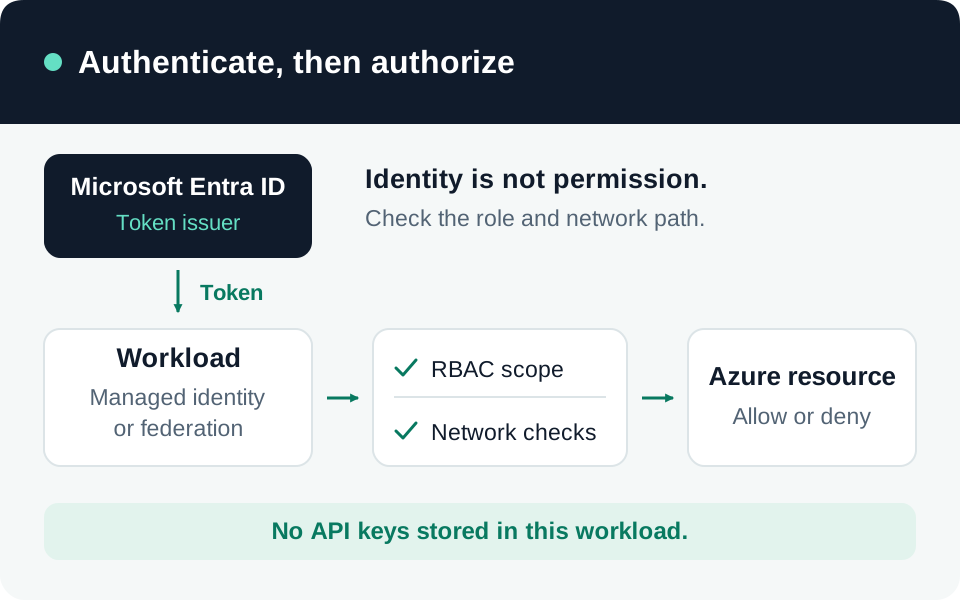
Workload identity federation replaces possession of a stored credential with proof from another trusted issuer. It does not remove the trust decision. A compromised workflow, workload host, or issuer configuration can still obtain tokens if it satisfies that decision. This guide covers Microsoft Entra application registrations and user-assigned managed identities, with GitHub Actions as a concrete example. It does not configure AWS trust policies.
Threat model, scope, and prerequisites
Consider an attacker who can modify an unprotected workflow, run code in a trusted environment, recreate a name-based repository identity, or add credentials to an application. The target is the Entra principal’s effective downstream permissions. Secretless authentication protects against copied permanent secrets; it cannot make a malicious trusted workload safe.
Record the external issuer, workload identity, target tenant/cloud, Entra application or managed identity, credential administrator, and resource owner. Obtain permission to manage the trust separately from permission to assign resource access. For app registrations, Microsoft documents application ownership or an authorized administrative role and the application-credential update permission. App trust prerequisites.
Standard federation is available in Workload ID’s free feature set. Premium workload Conditional Access and risk capabilities have separate licensing and eligibility; managed identities are not covered by the same Conditional Access feature. Log-export and resource-service costs remain separate. Workload ID capabilities.
Treat flexible credentials as preview, distinct from standard exact-match credentials. Record the actual SDK, management API, issuer, and credential type in the design. Do not paste a wildcard into a standard subject field and assume preview semantics apply.
1. Model both token audiences
The external workload obtains an issuer-signed assertion, presents it to Microsoft Entra as a client credential, and receives an Entra access token for a target resource. Standard federation compares issuer, subject, and audience case-sensitively. The external assertion and resource access token have different purposes. Federation exchange model.
| Boundary | What it establishes |
|---|---|
| External issuer and signature | Which identity provider vouched for the workload |
| External subject | Which particular workload or execution context may exchange |
| External audience | Whether the assertion was issued for this exchange purpose |
| Entra principal and resource permissions | Which identity and operations the target service accepts |
The commonly recommended external audience is api://AzureADTokenExchange in the commercial-cloud examples. It is not the downstream Graph, Search, or Azure Resource Manager audience. The client-credentials request identifies its target resource through that resource’s .default scope; the application receives only the permissions actually granted and enforced there. This is application authority, not delegated user OBO. Client-credentials requests.
2. Bind the standard credential to the actual execution context
Capture the issuer’s configured claim contract and inspect an authorized test assertion locally without saving its bearer value in tickets or logs. Verify iss, sub, and aud against the intended credential. A successful credential-creation request does not validate that a real workload will match it.
Microsoft documents a single audience value, a maximum of 20 credentials per application or user-assigned identity, no wildcard matching in standard credentials, and RS256 as the supported issuer-signing algorithm. Check user-assigned identity region support before provisioning. Federation restrictions.
For GitHub, select the intended environment, branch, pull-request, or tag context. The portal’s GitHub scenario derives claims from those inputs, but the resulting values must match the workflow. GitHub trust setup.
Our design requirement is to review who can make code execute in that context. An environment subject proves that the job uses that environment; your environment controls must establish which branches and approvals may reach it. An untrusted checkout or mutable dependency executed after token acquisition can exercise the same authority. Keep token issuance in a small deployment job and separate validation jobs that process untrusted contributions.
3. Address subject lifecycle and flexible matching
Do not infer today’s GitHub subject solely from an older name-based example. Microsoft’s migration guidance describes immutable subjects containing repository and owner IDs, with adoption affected by repository creation, renaming, transfer, or explicit opt-in. Validate the actual format before changing trust. Migrate by adding the new exact subject, switching issuance, verifying it, and removing the obsolete trust. Immutable-subject migration.
Flexible credentials currently support GitHub, GitLab, and Terraform Cloud on applications and user-assigned identities. GitHub expressions must match sub plus at least one immutable repository or owner identifier. The expression is a restricted language, not an arbitrary policy engine. Microsoft documents preview management interfaces and limitations in higher-level CLI/provider support. Flexible credentials.
Our recommendation is to choose exact matching when the permitted execution set is small. Flexible patterns reduce credential administration, but they also expand the set of executions to review. If production may deploy only from one workflow and owner, encode and test those boundaries rather than allowing every branch to solve a scaling problem. Treat each added alternative as another credential capable of reaching the same principal.
4. Separate credential trust from resource permission
Grant the federated principal only its required target roles and scopes. Use different principals for unrelated environments or workloads when they need different authority or independent revocation. Adding a second trusted issuer to one application does not create a second permission set: both can authenticate as that application.
Review other credentials on the principal as well. A retained client secret, certificate, or older federated credential can bypass the new execution restrictions. Migrate deliberately, verify each consumer, then remove obsolete alternatives. Never use broad Contributor permissions merely to demonstrate that federation works.
For an Azure-hosted workload using an application registration through managed-identity federation, Microsoft currently documents a user-assigned managed identity in the same tenant as the app. Its principal/object ID is the subject. Cross-tenant resource access requires the appropriate application provisioning and consent; cross-cloud token requests are unsupported, and exchange audiences vary by cloud. Managed identity as an application credential.
Choose direct managed-identity access when it satisfies the resource requirement. Adding an application-exchange hop can be justified by application permissions or tenancy needs, but creates another credential owner, permission inventory, and troubleshooting boundary.
5. Test exchange and authorization separately
Use isolated targets and issuer-produced assertions from controlled execution contexts. These are proposed tests:
| Test | Required outcome |
|---|---|
| Approved workload and exact claims | Exchange succeeds; narrow intended resource operation succeeds |
| Wrong repository, branch, environment, or issuer | Exchange denied under the chosen trust contract |
| Wrong external audience or expired assertion | Exchange denied without fallback credentials |
| Approved assertion, unrelated resource | Resource authorization denied despite successful authentication |
| Standard credential containing an assumed wildcard | Cannot become a permissive trust relationship |
| Flexible expression with another repository/owner ID | Denied even when a mutable name appears similar |
| Replacement identity with the same display name | Denied until its distinct identifier is explicitly authorized |
| Retired trust and old credential alternatives | New acquisition fails after observed propagation; remaining token access assessed |
Record sanitized claim values, credential identifiers, tenant, workload run, result code, target operation, and correlation IDs. Do not record assertion or access-token strings. Test inability to update the principal’s credentials and role assignments from the ordinary runtime identity.
Failure analysis and operating limits
An exchange failure and a target-service 403 require different investigations. First compare the actual issuer/subject/audience and tenant; then check propagation and credential type. Microsoft documents temporary AADSTS70021 failures after credential changes and requires sequential credential creation under the same user-assigned identity to avoid conflicts. Use bounded retries without widening trust. Propagation and concurrency.
A successful exchange followed by denial usually shifts the investigation toward resource scope, identity selection, network controls, or consent. Removing trust prevents future exchanges once effective; do not assume it recalls already issued tokens. Maintain a separately verified resource-containment procedure. Review trust whenever repositories move, workflow ownership changes, identities are replaced, or resource permissions expand.
Go to the source
References & further reading
- Microsoft Learn — Workload identity federation
- Microsoft Learn — Federated identity credential restrictions
- Microsoft Learn — Configure an app to trust an external identity provider
- Microsoft Learn — Flexible federated identity credentials
- Microsoft Learn — Migrate GitHub credentials to immutable subjects
- Microsoft Learn — Configure an application to trust a managed identity
- Microsoft Learn — OAuth client credentials flow
- Microsoft Learn — Microsoft Entra Workload ID licensing FAQ