
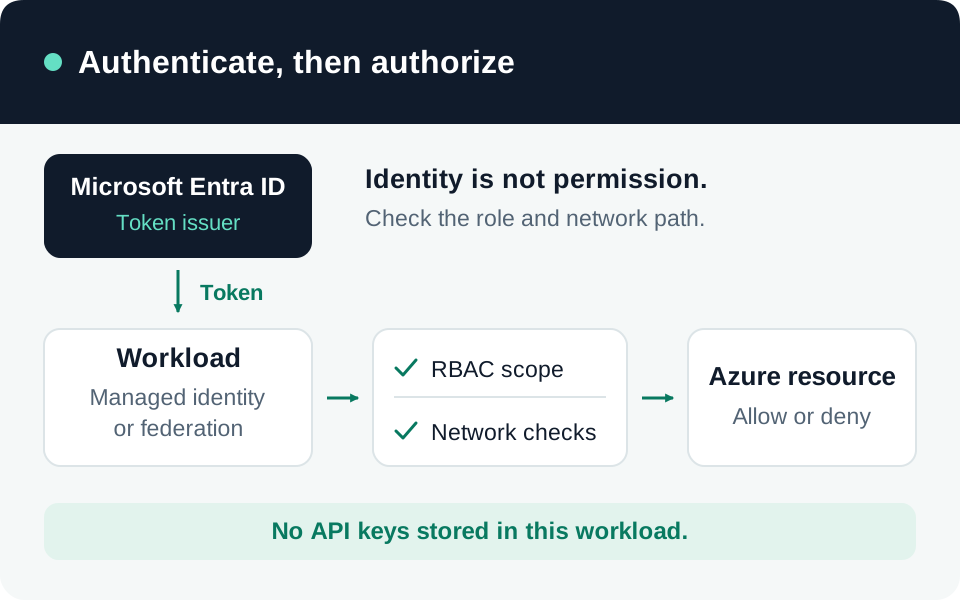
Keyless access removes a stored application secret, but it does not decide which data or operations the application should reach. Review three separate boundaries: authentication proves the caller, authorization permits an operation, and networking controls reachability. Foundry distinguishes resource-management operations from runtime data-plane operations; permission to manage a resource is not proof that inference or agent access is correctly scoped. Microsoft authentication and authorization guidance.
This guide covers an application’s access to Microsoft Foundry and Azure OpenAI. The checks below are a documentation-based review procedure, not a report of tests run against your tenant.
Identify the API before choosing a role
Record the tenant, subscription, resource or project ID, endpoint, API/SDK version, model deployment or agent, and required operation. Current Foundry projects and Azure OpenAI in Foundry classic have different role guidance. Do not copy a role from a similarly named tutorial without matching its API and resource type.
| Workload | Starting point to evaluate |
|---|---|
| Call an existing current-Foundry agent endpoint | Foundry Agent Consumer, scoped to the project or individual agent as needed. |
| Build and test agents in a current Foundry project | Foundry User; do not give development permissions to a runtime-only caller. |
| Direct Foundry Models inference covered by the keyless tutorial | Cognitive Services User at the Foundry resource scope, as documented for that inference path. |
| Azure OpenAI inference in the classic setup | Cognitive Services OpenAI User on the specific Azure OpenAI resource. |
Foundry roles were renamed from their earlier Azure AI names; role IDs remain unchanged. Agent-level assignments currently govern agent endpoint access only. The Azure portal currently offers Agent Consumer at account scope; use the documented CLI procedure for project or agent scope. Cognitive Services roles do not substitute for Foundry project roles. Current Foundry RBAC.
The direct-inference and classic rows follow their respective Foundry Models tutorial and classic Azure OpenAI instructions. The classic setup requires a custom-subdomain endpoint and an existing model deployment. Its role assignments can take up to five minutes to propagate; an immediate 403 is not a reason to grant Contributor.
Make the production caller predictable
Use a separate production identity. On a supported Azure host, a managed identity avoids storing its credential in application code. Choose a system-assigned identity for a lifecycle tied to that host, or a user-assigned identity when independent lifecycle or deliberate reuse is needed. Reuse also shares permissions, so record which workloads depend on it. Managed identity choices.
For production, prefer an explicit credential such as ManagedIdentityCredential, or a deliberately restricted credential chain. DefaultAzureCredential is useful during development but can select environment or developer credentials. A successful laptop request does not establish that the deployed identity works. Remove unintended developer sessions, environment credentials and API-key fallbacks from the production configuration. Microsoft credential-selection recommendations.
Match the token audience and endpoint to the API’s current documentation. Record the principal and assignment scope used; never place access tokens or keys in diagnostic logs.
Close the remaining key and network paths
Changing one client to Entra ID leaves key-based access available until it is separately disabled. Inventory all consumers before setting disableLocalAuth=true on the supported resource. Verify a formerly valid key is rejected by the data plane: Microsoft warns that gateway caches can delay enforcement for minutes or several hours. A configuration flag alone is insufficient evidence of cutoff. Disable and verify local authentication.
Review public-network access, private endpoints, DNS and outbound dependencies independently. Foundry network-isolation support varies by feature; a private endpoint does not replace RBAC. Test from both the intended network and a location that should be blocked. Foundry network isolation.
Keep evidence of allowed and denied operations
Run these checks in an isolated test resource with synthetic data and the actual deployed identity:
| Check | Evidence to retain |
|---|---|
| Perform the required inference or agent call | Successful operation, principal, target and request ID. |
| Call an unrelated resource or agent | Denial consistent with the intended assignment scope. |
| Attempt a management operation the runtime does not need | Denial; no broad inherited role silently authorizes it. |
| Remove the test assignment and retry | Observed enforcement time, including cached-token or propagation behavior. |
| Retry with the retired key and from a disallowed network | Both alternate paths fail as designed. |
Record the configuration, timestamp and sanitized result for each test. Diagnose identity, role, endpoint and network failures separately. If this workload serves end users, separately test their application-level authorization: its managed identity does not automatically restrict each user to their own records. Repeat the review after changing identities, endpoints, roles or connected data sources.
Go to the source
References & further reading
- Microsoft Learn — Authentication and authorization in Microsoft Foundry
- Microsoft Learn — Role-based access control for Microsoft Foundry
- Microsoft Learn — Configure keyless authentication with Microsoft Entra ID
- Microsoft Learn — Azure OpenAI with Microsoft Entra ID authentication (classic)
- Microsoft Learn — Disable local authentication in Foundry Tools
- Microsoft Learn — Configure network isolation for Microsoft Foundry