
This guide covers organizational data in Microsoft 365 Copilot and the relevant Copilot Chat experiences. Consumer accounts, custom Foundry applications, and third-party agents need their own boundary review. Verify your licenses, enabled features, and tenant rollout before relying on a control. The acceptance checks below are recommendations to run in your environment, not claimed lab results.
Repair access before evaluating answers
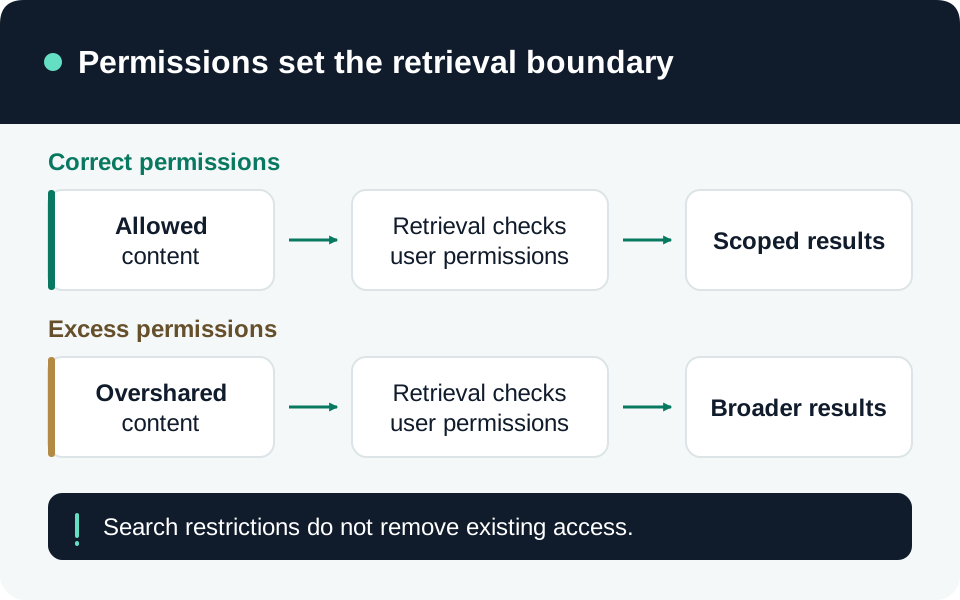
Microsoft states that Copilot surfaces organizational content within the user’s existing view permissions. It also states that prompts, responses, and Microsoft Graph data are not used to train foundation LLMs. That training commitment does not correct excessive sharing inside your tenant. Copilot data and permission commitments.
Our recommended inventory begins with sensitive SharePoint sites and OneDrive locations. For each, record the owner, intended audience, effective groups, external participants, sharing links, and broken inheritance. Include Teams private and shared channel sites separately. Ask owners to justify broad access, remove unnecessary grants, and assign a review date. A failed Copilot search is not proof that an underlying file is inaccessible.
Distinguish discovery from authorization
Restricted Content Discovery (RCD) temporarily reduces discovery from selected SharePoint sites in tenant-wide search and Copilot. It does not remove permissions or prevent an authorized user opening content directly. It does not cover OneDrive sites, site-scoped search, or summarizing an already open document. Propagation is not immediate. Use it selectively while fixing access, rather than recording it as an access revocation. RCD scope and prerequisites.
Restricted Access Control (RAC) adds a control-group requirement: a user needs both an existing content permission and membership in an allowed group. Group membership alone grants no content permission. Teams private/shared channel sites require separate configuration; for shared channels, external participants from another tenant are not evaluated against RAC and retain the channel/site permission model. These exceptions matter when testing guest access. RAC behavior and channel-site exceptions.
Check protection and processing separately
For encrypted content, Copilot requires the user’s VIEW and EXTRACT rights to summarize it. VIEW without EXTRACT can still permit a link to the file; Double Key Encryption prevents Copilot from using the content. A citation therefore does not prove that protected text was processed. Encryption and Copilot behavior.
A Copilot DLP rule based on sensitivity labels can exclude file/email content from a generated answer while leaving the item in citations. Current coverage includes emails sent from January 1, 2025, but excludes calendar invitations. In Word, Excel, and PowerPoint, reopen a file after a mid-session label change to trigger the relevant evaluation. Copilot DLP coverage.
Keep DLP actions distinct: preventing a sensitive prompt from being processed differs from blocking only its external web search. Prompt-processing restrictions are in preview and tenant rollout must be verified. Microsoft also documents that prompt DLP does not scan the contents of directly uploaded files; do not infer that typing and attachment paths have identical coverage. Prompt controls and upload limitation.
Account for web search and retained interactions
Copilot can generate a Bing search query from a prompt and, in some contexts, referenced document data. Generated queries have different terms from Microsoft 365 prompts/responses: Microsoft says the DPA and EU Data Boundary do not apply to those queries. Review the Allow web search in Copilot policy in Cloud Policy service for Microsoft 365. Web-search data handling and controls.
Purview Audit records who interacted, the context, and referenced resources; it does not contain prompt/response text. Use the appropriately authorized eDiscovery or DSPM for AI capability for content investigations. Include retained interactions and uploaded files in your data-management review. Interaction storage and audit.
Run a repeatable acceptance check
Use synthetic files and ordinary pilot accounts. Our recommended evidence matrix is:
| Case | Evidence to record |
|---|---|
| Intended reader with permission | Direct-open result, Copilot citation, and whether summarization is permitted. |
| User without permission | Denied direct access and no protected content in the answer; retain the tested identity and resource. |
| RCD-only restriction | Reduced tenant-wide discovery, while expected direct access remains. |
| RAC exclusion | Denied access despite an older sharing grant; test external shared-channel participants separately. |
| Encryption or DLP restriction | Content-use result separately from citation visibility; include application reopen where required. |
Record policy scope, test time, propagation allowance, and the actual outcome. Investigate unexpected access at its source. Re-run relevant cases after group, sharing, label, connector, or policy changes; assign an owner to each unresolved result before expanding the rollout.
Go to the source
References & further reading
- Microsoft Learn — Data, privacy, and security for Microsoft Copilot
- Microsoft Learn — Restrict discovery of SharePoint sites and content
- Microsoft Learn — Restrict SharePoint site access with control groups
- Microsoft Learn — Data protection and auditing for Microsoft Copilot
- Microsoft Learn — Microsoft Purview DLP for Microsoft 365 Copilot
- Microsoft Learn — Data, privacy, and security for Copilot web search