
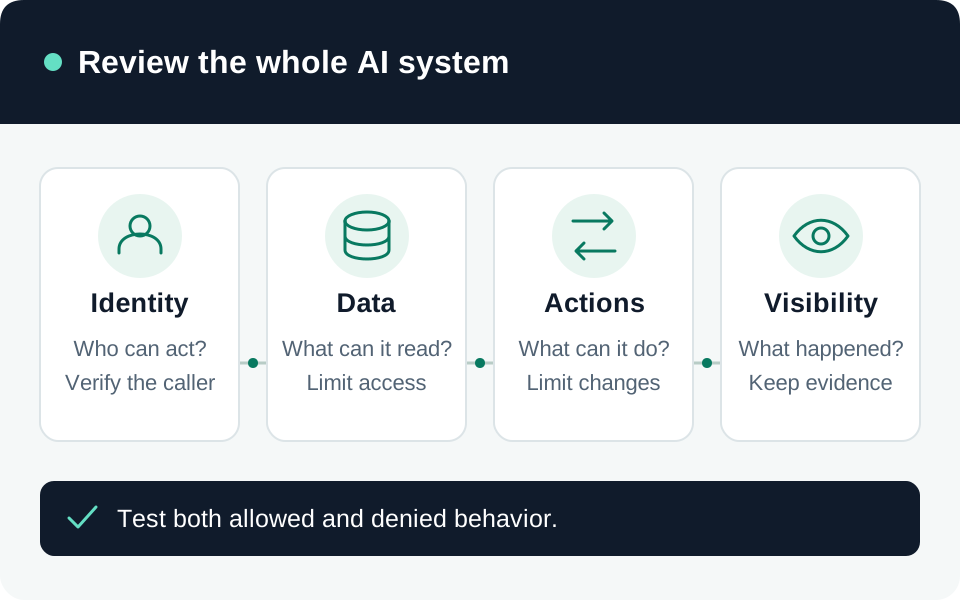
An AI security baseline starts with the complete application: users, identities, retrieval, model, tools, and stored results. This worksheet covers Microsoft 365 Copilot, applications built with Microsoft Foundry, and Copilot Studio agents. Their controls differ; a setting in one product does not establish protection in another. The checks below are recommended acceptance criteria, not results from testing your environment.
Record the workload before choosing controls
Create a one-page record for each deployment. Name its business owner, technical owner, audience, approved purpose, and incident contact. Record the exact product experience, tenant or subscription, region, model provider and version, deployment type, and available licenses. For Foundry, distinguish the current experience from classic or hub-based configurations before following implementation instructions.
List every connected data source and outbound destination, including web search, connectors, MCP servers, and logs. Classify whether the application only reads, proposes changes, or executes them. Our recommended deliverable is a data-flow drawing with a named identity and authorization check on every connection. Record unsupported assumptions as findings with owners.
Separate sign-in, resource access, and data scope
Microsoft recommends identity-based authentication where Azure services support it, narrowly scoped resource permissions, and governed agent identities. A valid login establishes identity; it does not establish that a particular document or action is authorized. Review each downstream role assignment and the service-specific network baseline. Azure AI security guidance.
For Microsoft 365 Copilot, Microsoft states that organizational content is surfaced within the user’s existing view permissions. An oversized SharePoint group can therefore remain a problem even when Copilot respects authorization. This statement does not establish the permission behavior of your custom application or an agent’s separate connection. Copilot’s documented data boundary.
Our recommended check: trace one request from the signed-in user to the identity used at the data store. Record whether access is delegated or application-owned. Use a non-administrator test account, verify one permitted resource and one prohibited resource, and check the actual resource authorization result as well as the generated answer.
Put enforcement around tools and actions
Copilot Studio data policies can restrict authentication choices, connectors, HTTP endpoints, publication channels, and event triggers. Verify the policy’s environment scope and its effect on the deployed agent; a connector’s presence in a catalog is not approval to use it. Agent data-policy controls.
For custom agents, perform authorization at each tool invocation and derive tenant context from trusted application state or tokens. Microsoft’s architecture guidance explicitly rejects model instructions as a tenant-isolation boundary. Human approval for consequential actions complements authorization; it does not replace it. Agent isolation and tool authorization.
Our recommended action register names the allowed operation, target scope, executing identity, approval requirement, and revocation method. For a record-changing tool, test that a changed target identifier is rejected and a missing approval produces no side effect.
Test adversarial input without trusting refusal text
Prompt Shields adds detection for attacks in user prompts and external documents. Verify that the selected control is assigned to the relevant deployment or agent and that detection versus blocking matches your intent. A filter is an additional layer, not evidence that every attack is prevented. Prompt Shields configuration and limitations.
Use synthetic, non-sensitive test material. Our suggested cases are an ordinary request, an unauthorized retrieval attempt, an instruction embedded in a retrieved document, and an attempted unauthorized tool call. Inspect data access and action records: a reassuring refusal is insufficient if the application already retrieved or changed protected data.
Prove observability and an exit path
Azure platform metrics and the Activity Log are collected automatically, but resource-log collection requires diagnostic settings. Available categories depend on the service. Azure Monitor diagnostic settings.
For Microsoft 365 Copilot, Purview Audit records interaction metadata and referenced resources, not prompt or response text. eDiscovery or DSPM for AI serves the content-investigation use case. Copilot auditing and storage.
Our recommended release evidence includes a traceable allowed action, a denied action, a delivered alert, an approved retention period, and a tested way to suspend access. Restrict investigators’ access to sensitive transcripts. Record unresolved findings and a release decision; repeat the relevant checks when models, identities, sources, tools, or policies change.
Go to the source
References & further reading
- Microsoft Learn — Secure Azure platform services for AI
- Microsoft Learn — Data, privacy, and security for Microsoft Copilot
- Microsoft Learn — Considerations for multitenant agentic systems
- Microsoft Learn — Configure data policies for agents
- Microsoft Learn — Prompt Shields in Microsoft Foundry
- Microsoft Learn — Diagnostic settings in Azure Monitor
- Microsoft Learn — Data protection and auditing for Microsoft Copilot