
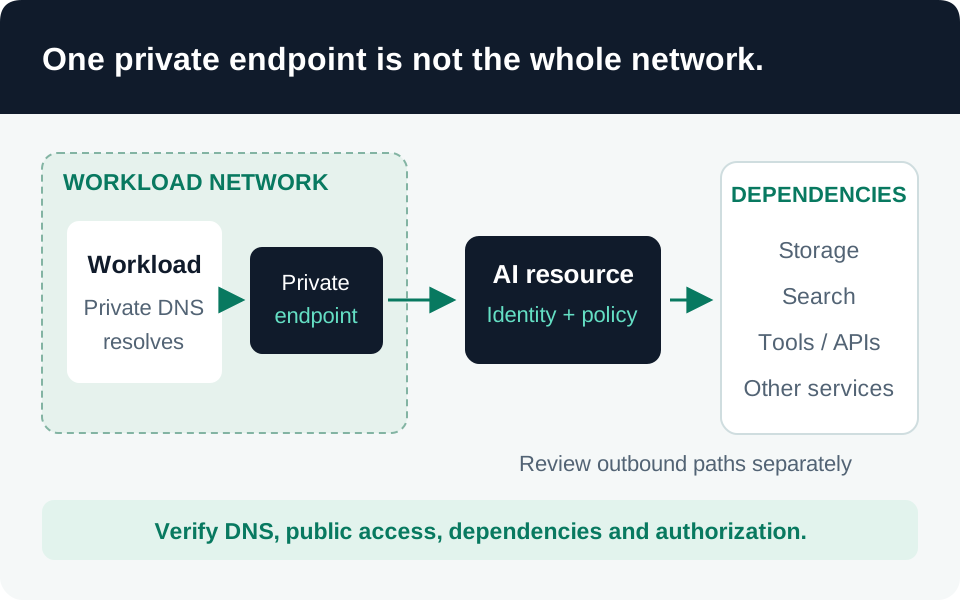
A private endpoint proves that a private connection exists; it does not prove that every path into or out of an AI application is private. This guide provides a validation sequence for Microsoft Foundry resources and their dependencies. Confirm the exact resource type and product experience first: current Foundry networking instructions are not interchangeable with every classic hub or Azure Machine Learning setup.
Prerequisites
Prepare an architecture inventory, an authorized network change window, a rollback plan, and test clients inside and outside the intended boundary. Identify who can create the private endpoint, approve its connection, and manage DNS. Record the application’s real endpoint hostnames and downstream services; include deployment automation and administrator access, not only end users.
Microsoft distinguishes inbound resource access, outbound resource access, and agent-client access to dependencies. Use those as three separate acceptance areas. Foundry network-isolation model.
1. Establish private inbound access
Create the endpoint for the intended Foundry resource and subnet, then verify that its connection is approved. A pending request is not a working private connection. Inspect the resource’s public-network-access setting separately: use the setting appropriate to your approved design rather than assuming endpoint creation disabled public access.
Keep identity controls in place. Private Link supplies private connectivity to a service; it is not a replacement for authenticating the caller or limiting resource permissions. Pair this work with the workload identity guide. Private endpoint concepts, Azure AI access guidance.
2. Test DNS from the actual callers
From the application host, administrator path, and deployment runner, resolve the configured endpoint hostname. Compare the result with the endpoint’s private address and record the DNS server used. Test HTTPS using the normal service hostname; do not replace it with an IP address in application configuration.
Use the service-specific private DNS zones and appropriate virtual-network links or forwarding. A successful public DNS lookup is not evidence of public data access; DNS resolution and access control are independent. Conversely, a private endpoint in the portal is insufficient if the application resolves or routes incorrectly. Private endpoint DNS guidance.
3. Review outbound paths independently
Inventory every dependency used by the deployed workflow: storage, search, secrets, state, telemetry, tool endpoints, and model access. Mark each as private, explicitly permitted public, or prohibited. For Agent Service, follow its supported private-networking and virtual-network-injection design instead of assuming an inbound endpoint secures agent egress.
Microsoft notes that tools such as Bing, web search, and SharePoint can communicate through public endpoints. If that conflicts with your policy, restrict those capabilities; do not describe the resulting deployment as fully private while silently retaining them. Foundry outbound networking and public tools.
4. Collect positive and negative evidence
Our recommended acceptance matrix is:
| Test | Expected evidence |
|---|---|
| Authorized caller on approved network | Correct DNS, successful TLS request, and an authorized application response. |
| Same identity outside the approved boundary | Data-plane access denied by the network policy. |
| Unauthorized identity inside the network | Authentication or authorization denied despite connectivity. |
| Required dependency call | Verified route and successful operation using its intended identity. |
| Unapproved destination | Rejection at the applicable egress or tool-enforcement boundary. |
Record resource IDs, settings, timestamps, and outcomes. These are proposed tests, not results from a live deployment.
Failure modes to investigate
A DNS failure, network denial, and RBAC denial require different remedies. Do not restore unrestricted public access as a permanent fix for a deployment-runner problem. Check approval status, DNS forwarding, route/firewall rules, and identity independently. Repeat the matrix after adding a tool, changing a subnet or resolver, or promoting a new application version. Keep a documented administrative recovery path that preserves the intended boundary.
Go to the source